名古屋市緑政土木局の RFI に応答する Eukarya プロトタイプ紹介デッキ。公園・施設の GIS と、点検・修繕の業務ワークフロー(庁内職員 × 現場業者)を単一スタックで提供する実装例。
Eukarya prototype deck for the Nagoya City Greenery and Public Works Bureau RFI, showcasing a unified GIS and inspection/maintenance workflow platform for municipal staff and field contractors.
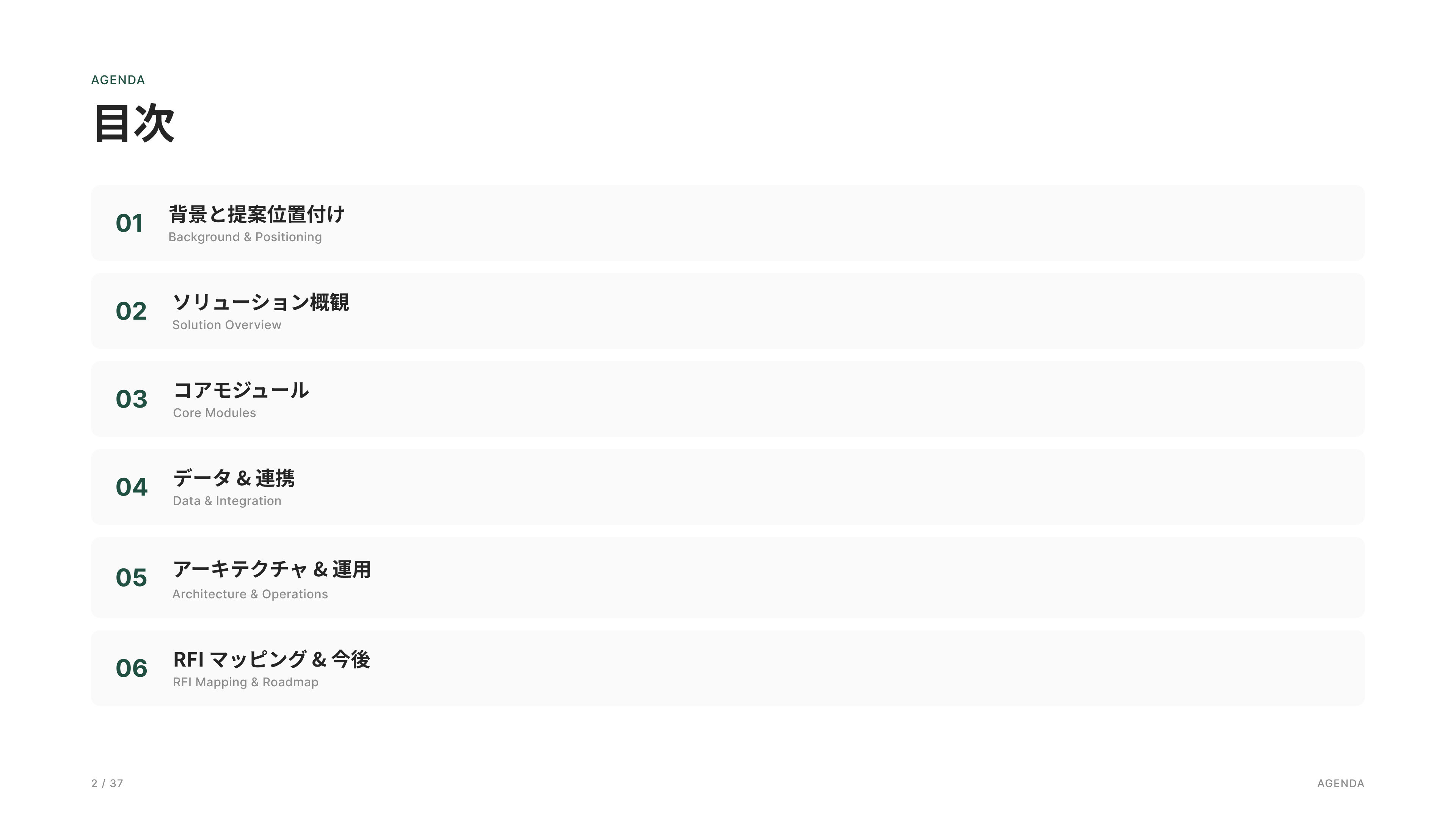
背景・提案位置付け、ソリューション概観、コアモジュール、データ連携、アーキテクチャ/運用、RFIマッピング、ロードマップ、Appendix、Brief。
Background & Proposal Context, Solution Overview, Core Modules, Data Integration, Architecture & Operations, RFI Mapping, Roadmap, Appendix, and Executive Brief.
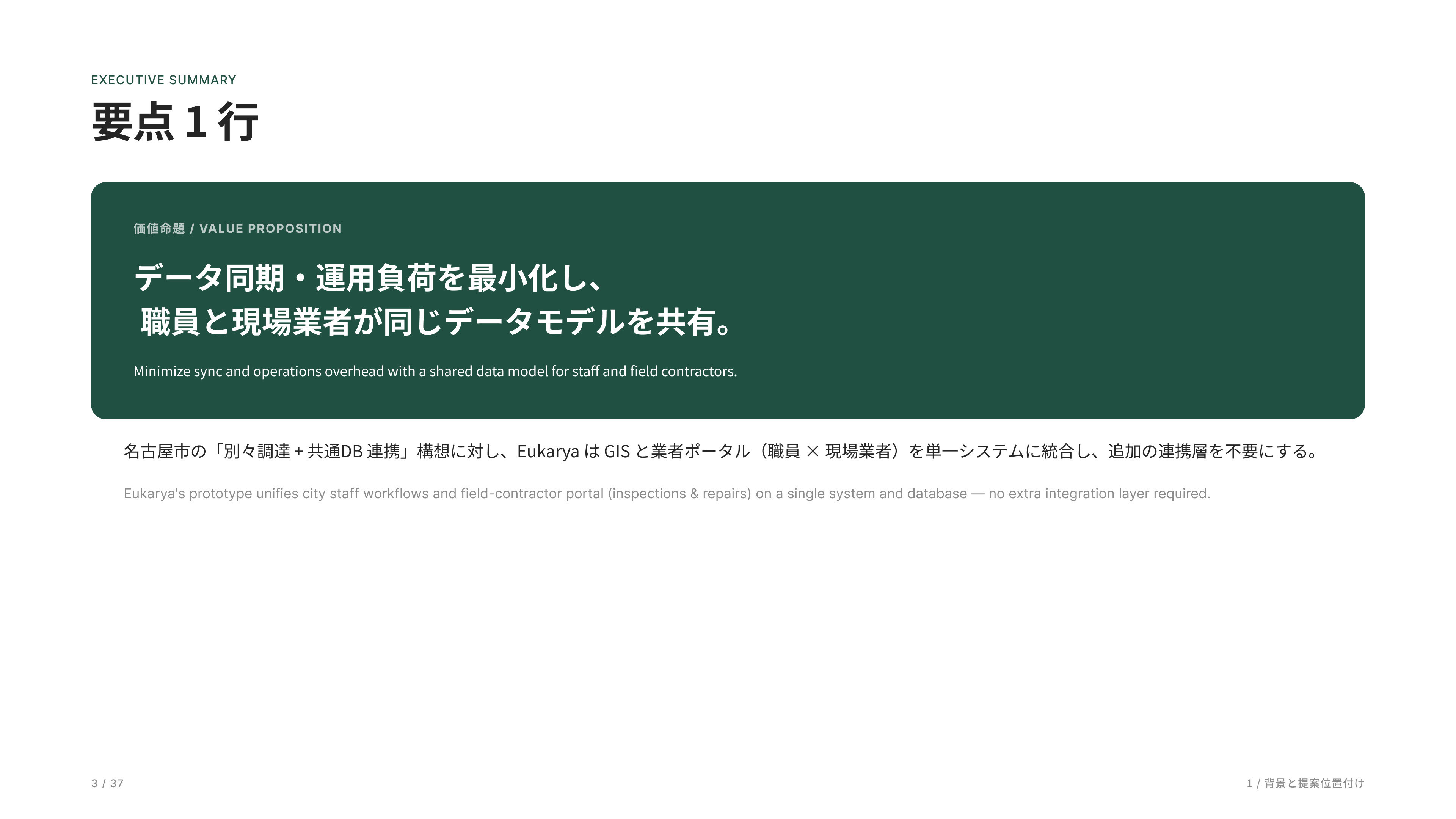
このプロジェクトの核は、「庁内業務と現場業者を一つのシステムで扱える」ことです。
職員は地図と案件管理、業者はタブレットで現場入力を行い、両者が同じデータベース・同じデータモデルで動いています。
そのため、連携層や同期処理、整合監視が不要なのが構造的な強みです。
The core of this project is a unified platform that connects municipal staff and field contractors within a single system. Staff manage assets and work orders through GIS-based tools, while contractors perform field inspections and updates via tablets. Both operate on the same database and data model, eliminating the need for integration layers, synchronization processes, or data consistency monitoring.
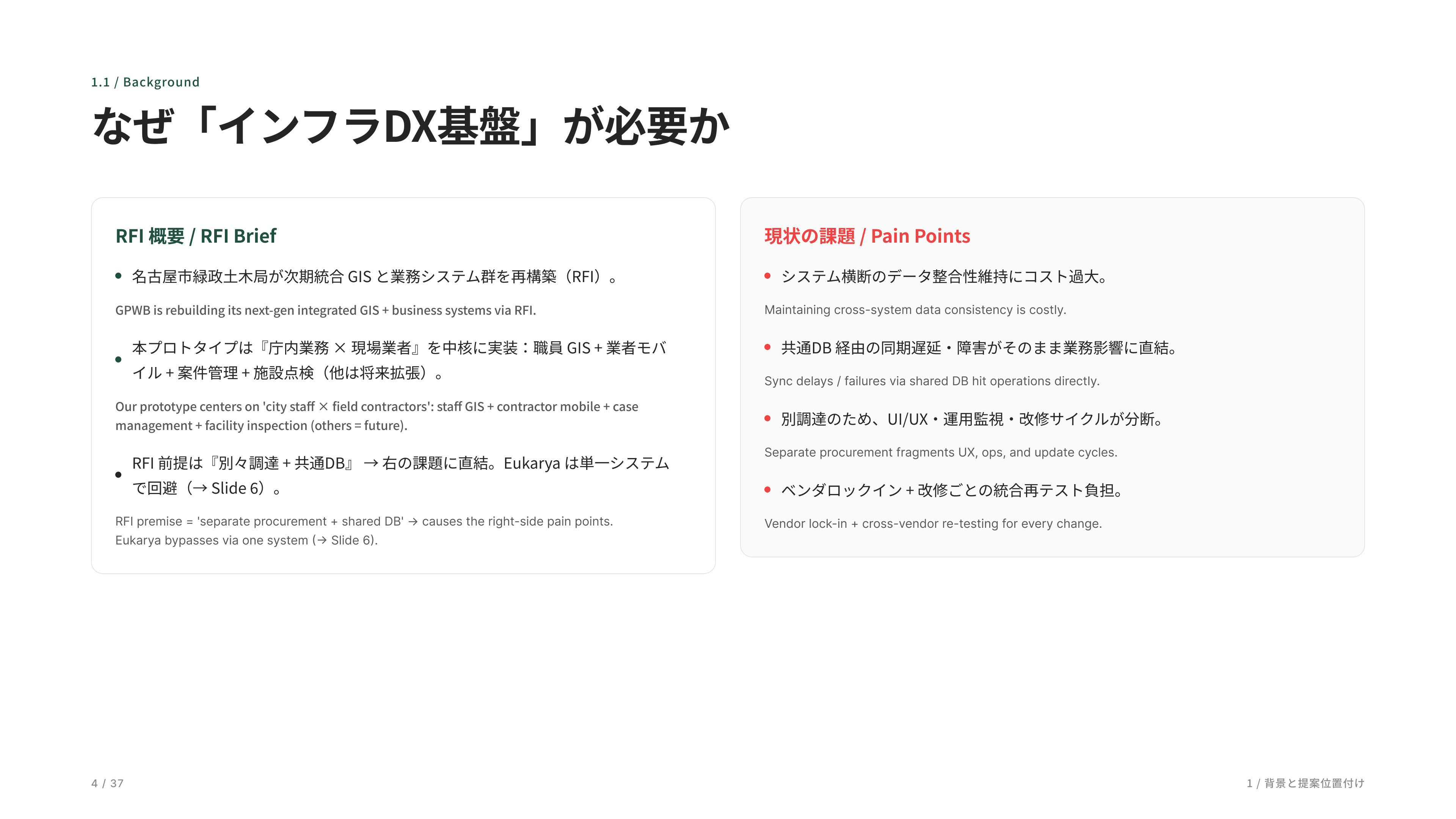
ここで RFI の背景と現状課題を説明します。名古屋市の RFI は、「複数ベンダを共通DBで繋ぐ」前提の構成です。ただ、その方式ではデータ整合コスト、同期遅延、UX・運用分断、ベンダロックインといった構造的な問題が発生します。私たちは、庁内と現場を一つのシステムに統合することで、それらを構造ごと回避しています。
This section outlines the RFI background and current challenges. The Nagoya City RFI assumes an architecture where multiple vendors are connected through a shared database. However, this approach introduces structural issues such as data consistency costs, synchronization delays, fragmented user experiences and operations, and vendor lock-in. Our approach avoids these challenges at the architectural level by unifying municipal staff and field contractors within a single integrated system.
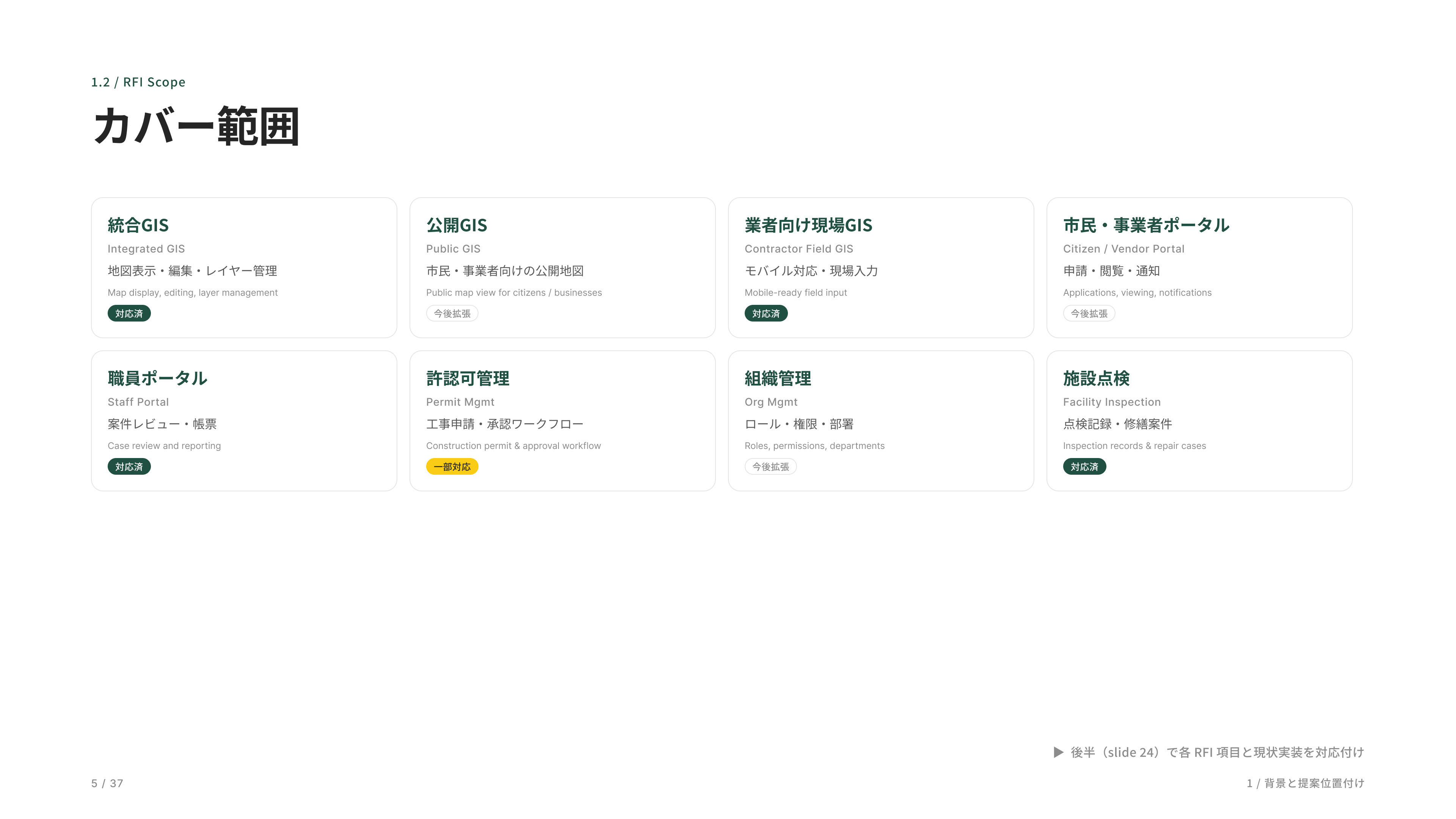
RFI が要求する 8 つの領域を一覧にしました。各カードのバッジで実装状況が分かるようにしてあります。緑が「対応済み」で 4 つ、黄色が「一部対応」が 1 つ、グレーが「今後拡張」予定です。
This slide summarizes the eight domains defined in the RFI. Status badges indicate the implementation level for each area: green represents fully supported capabilities, yellow indicates partial support, and gray marks areas planned for future expansion.
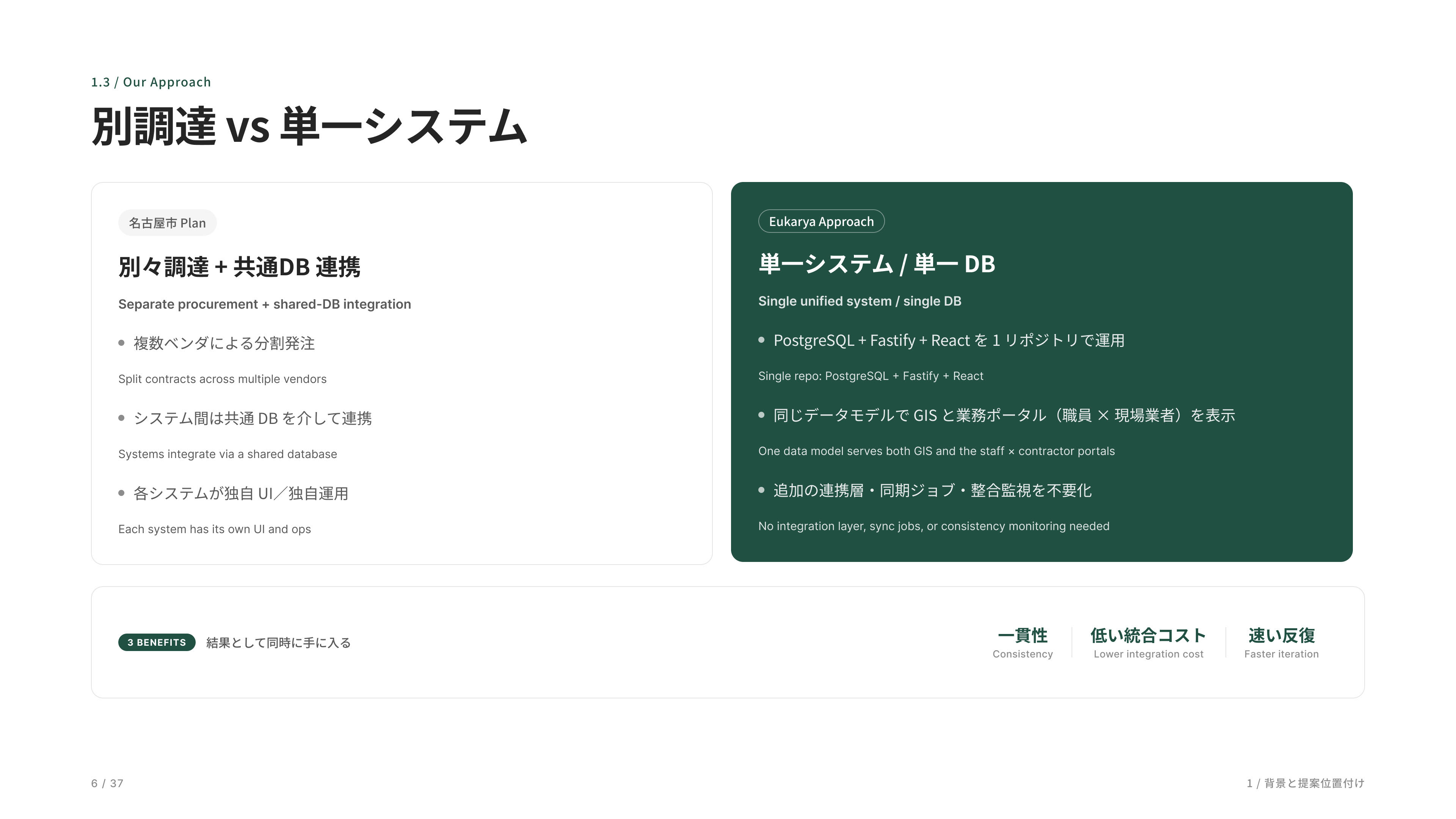
ここがソリューションの核心です。左が名古屋市が想定している分離調達モデル、右が私たちの一体型アプローチ。下に 3 つの利点を並べました。一貫性、低い統合コスト、速い反復、この 3 つを単一システムで実現します。
This is the core of the solution. The left side illustrates the separated procurement model assumed by the RFI, while the right side shows our integrated approach. The three key benefits are consistency, lower integration costs, and faster iteration—all enabled through a single unified system.
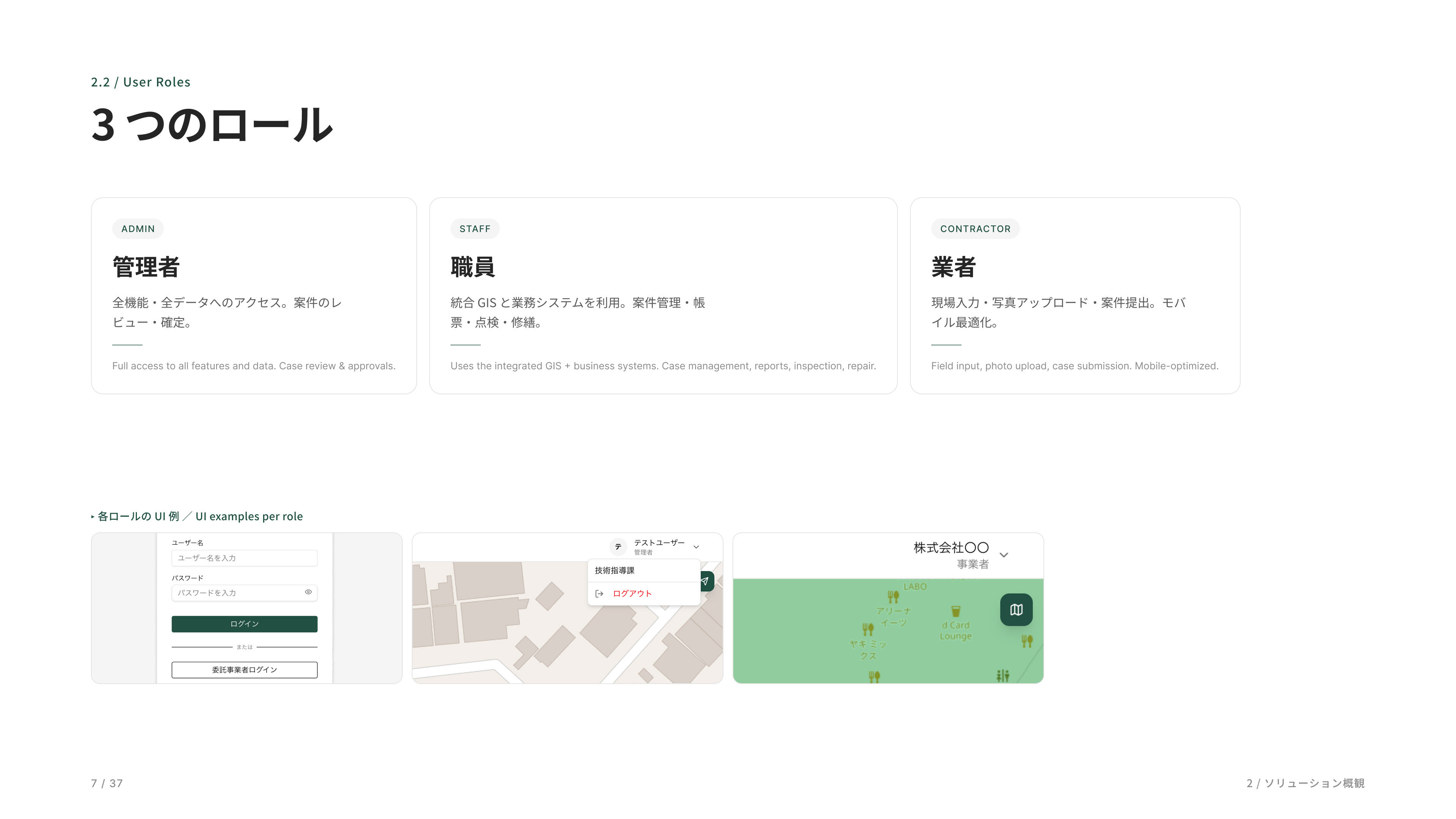
ロールは管理者、職員、業者の 3 つです。市民向けの公開 UI は今のところ未実装で、データを外部に出す Delivery API だけ用意しています。
The system currently supports three roles: administrators, municipal staff, and contractors. A public-facing citizen portal has not yet been implemented; however, a Delivery API is available to expose data to external services when needed.
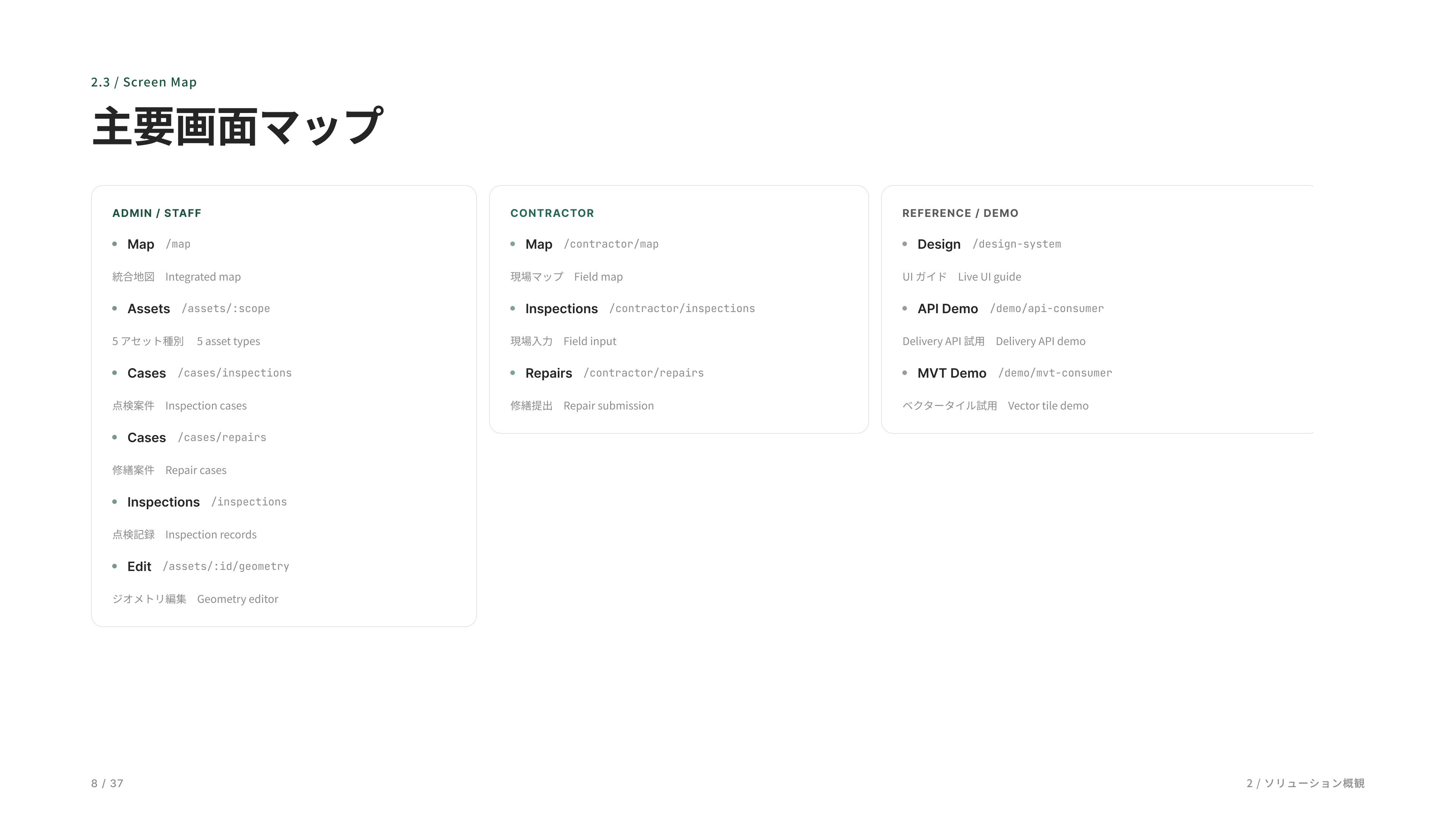
全体の画面マップです。管理者・職員、業者、リファレンス・デモの 3 グループに分けて整理しています。
This is the overall screen map of the platform, organized into three groups: Administrator & Staff, Contractor, and Reference & Demo.
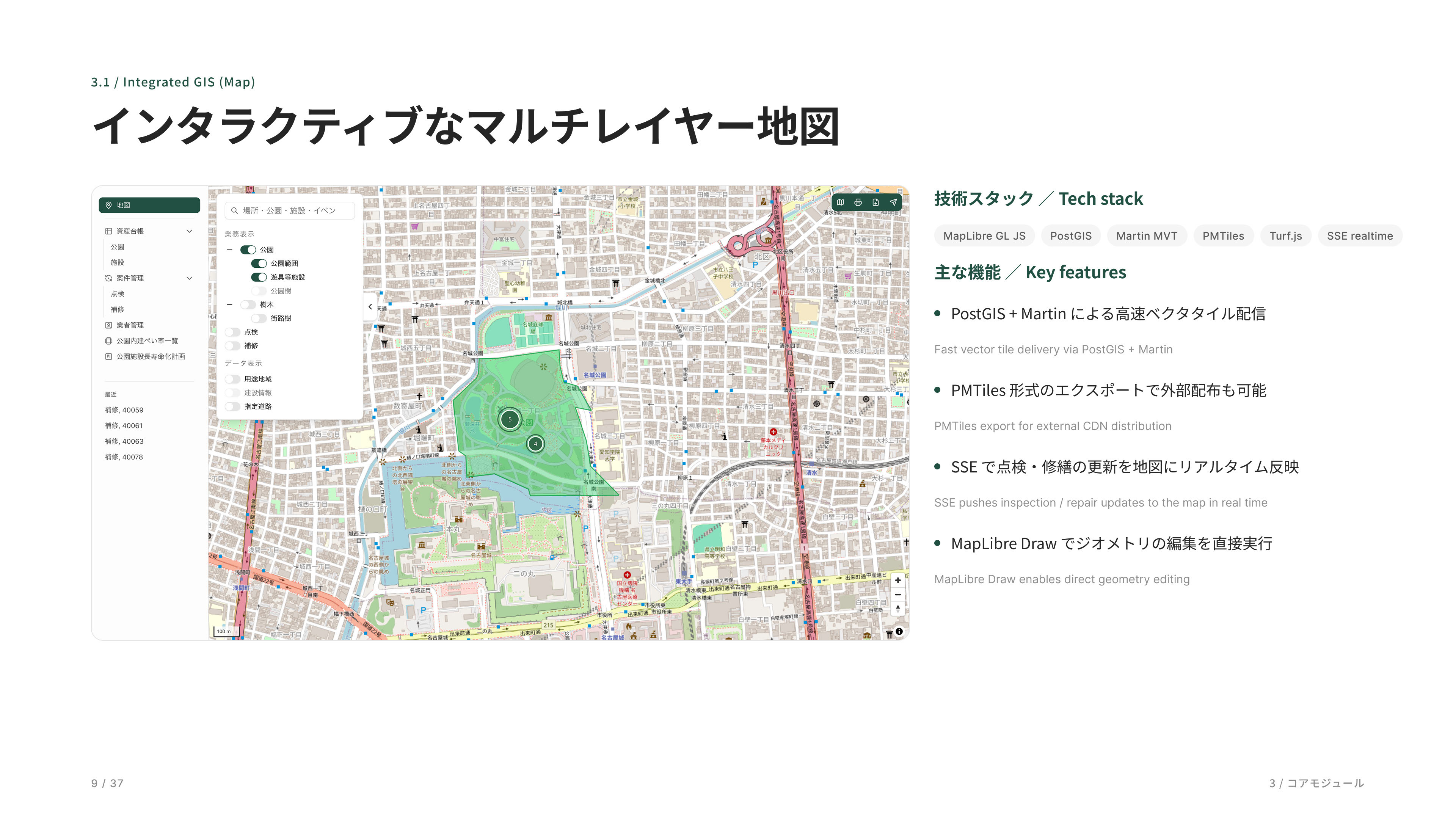
メインの地図画面です。MapLibre と PostGIS でできていて、点検や修繕の更新がリアルタイムで地図に反映されます。
This is the main GIS interface. Built on MapLibre and PostGIS, it provides a real-time view of parks, facilities, inspections, and maintenance activities, with updates immediately reflected on the map as work progresses.
都市インフラを一枚の地図にまとめた統合マップです。気になるエリアにズームすると施設が一つひとつのピンで表示され、クリックすればその場で写真や諸元を確認できます。
This integrated map brings urban infrastructure into a single view. As users zoom into an area of interest, individual facilities appear as map pins, allowing photos, specifications, and asset details to be accessed directly with a click.
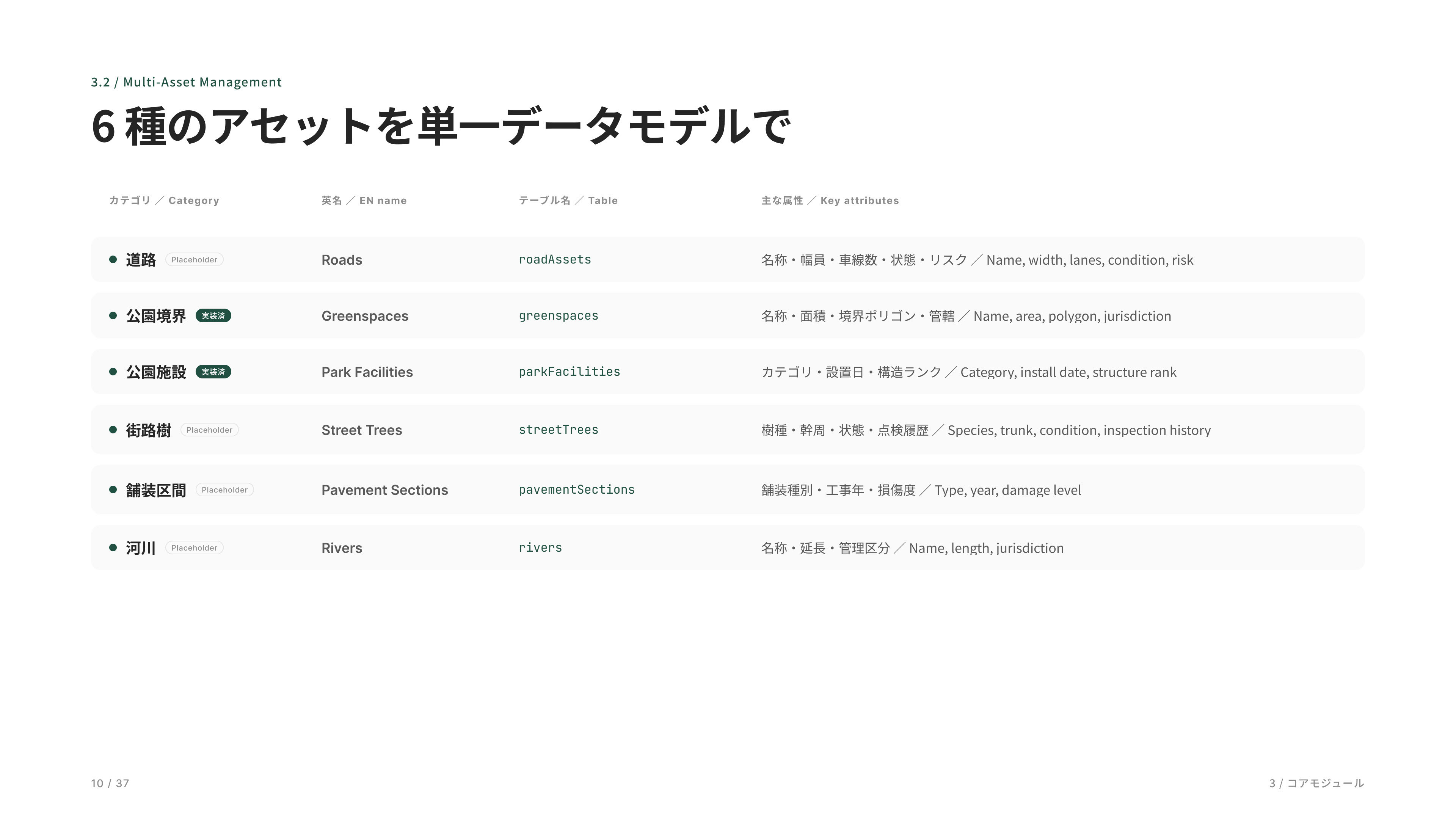
スキーマは 6 種類のアセットを用意してあります。最新プロトタイプで実装しているのは 2 種類、公園境界と公園施設です。残りの道路・街路樹・舗装区間・河川はデータモデルだけあって、必要になったら同じ仕組みで追加できる作りです。点検や修繕はどのアセットにも同じパターンで紐づけられます。
The schema defines six asset types. The current prototype implements two of them—park boundaries and park facilities. The remaining asset categories—roads, street trees, pavement segments, and rivers—are already modeled in the data structure and can be added using the same framework when needed. Inspections and maintenance records are linked to all asset types through a common workflow pattern.
公園の資産を一覧できる台帳です。検索に入力するだけで瞬時に絞り込め、行をクリックすればその場で詳細が開きます。
Asset registry for park infrastructure. Users can instantly filter records through search, and open detailed asset information directly from the list view with a single click.
公園施設の詳細画面です。写真や基本情報に加え、構造ランクや摩耗ランクなどの健全度評価、過去の点検履歴や補修履歴までを一元管理できます。施設ごとの状態変化や対応履歴を時系列で確認できるため、維持管理や修繕計画の判断を効率的に行えます。
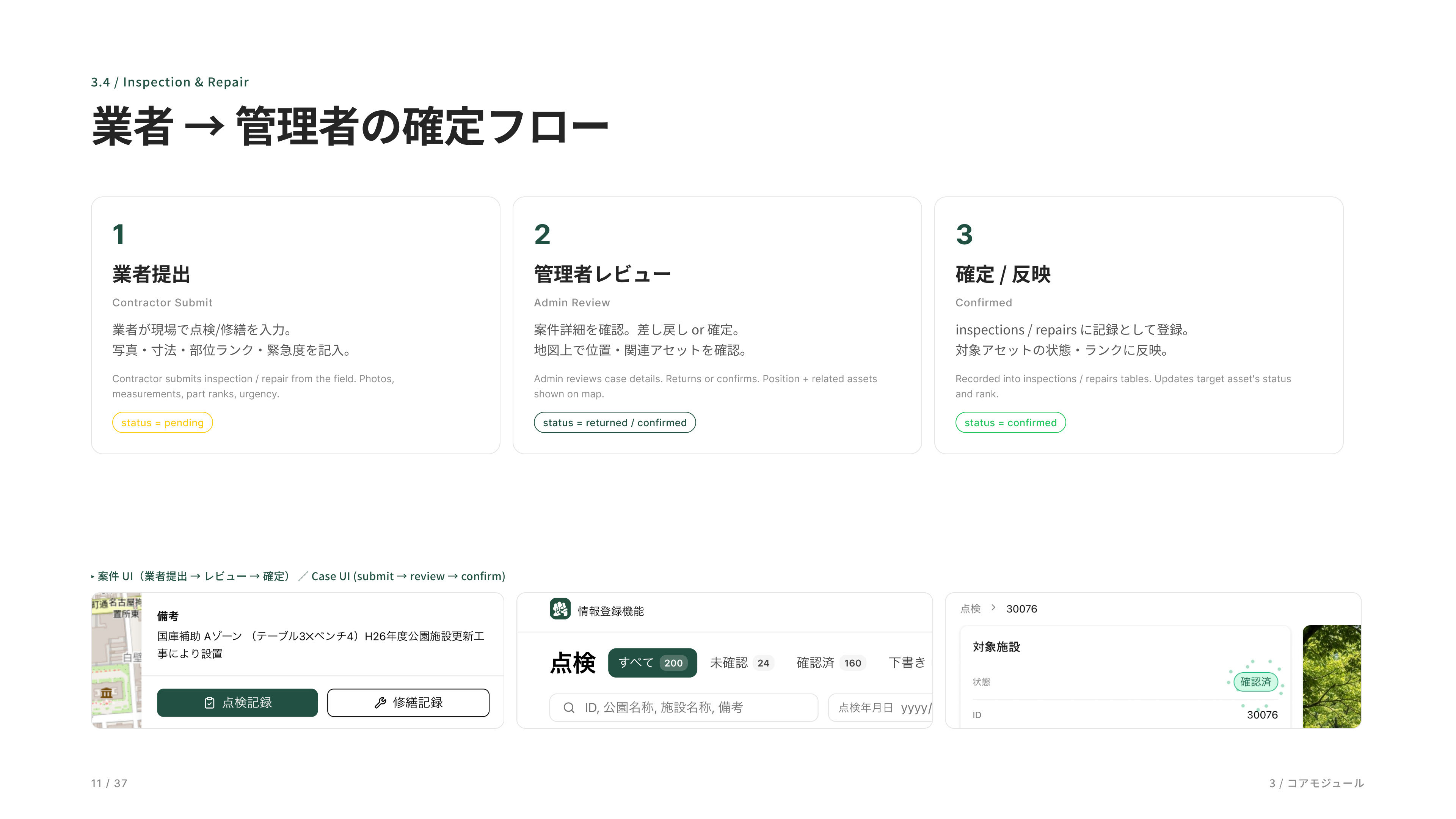
案件管理のフローです。業者さんが現場で写真と一緒に提出、管理者が確認、確定の 3 ステップ。緊急度と部位ランクでトリアージできます。
This is the work order management workflow. Contractors submit inspection results from the field with photos, administrators review the submission, and approved records are finalized through a simple three-step process. Priority and component condition ratings enable efficient triage and maintenance planning.
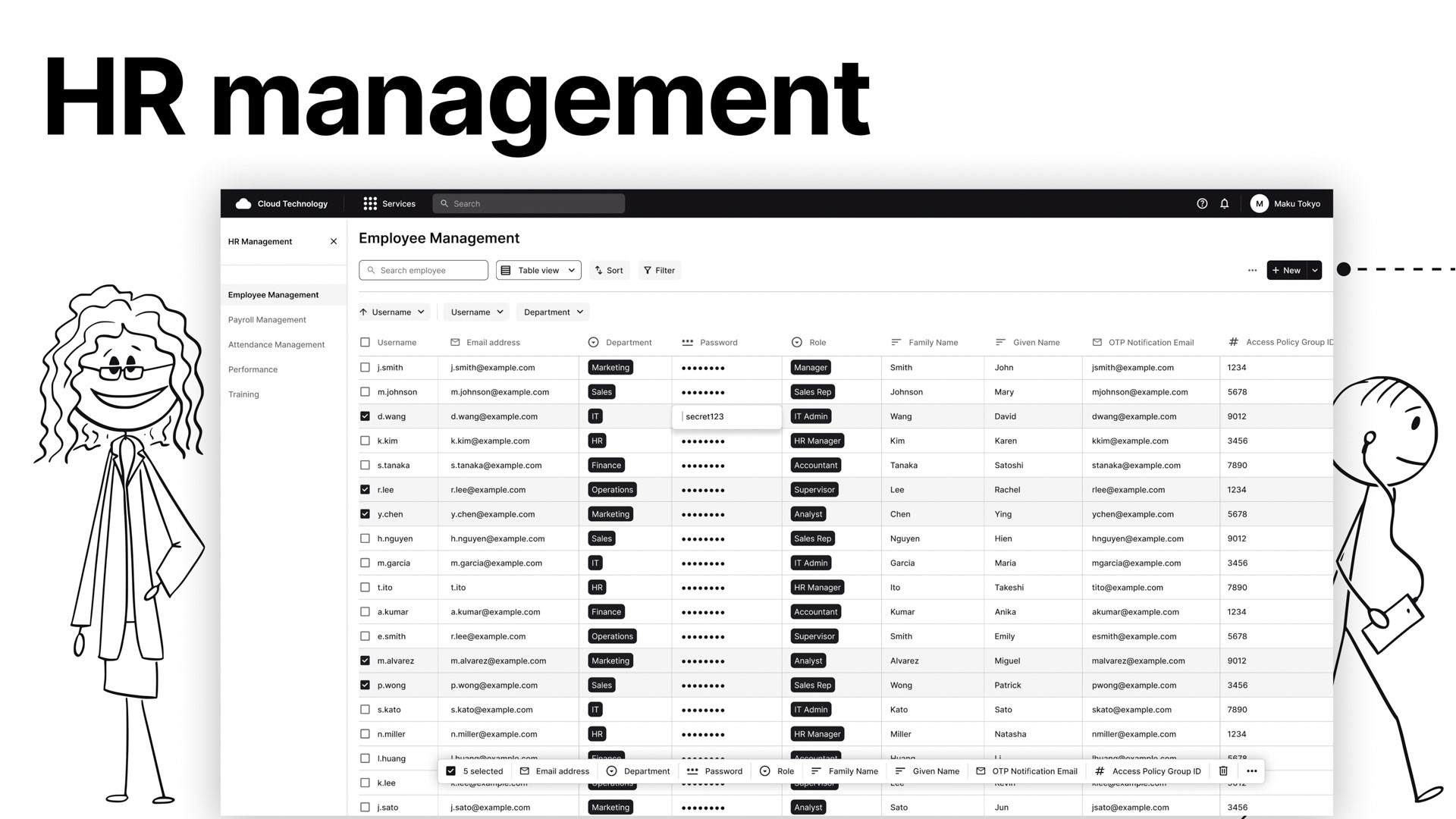
公園アセットおよび点検案件の一覧画面です。公園や施設などのアセット情報を検索・フィルターしながら管理できるほか、点検案件は未確認・確認済みや緊急度、対応状況で絞り込むことができます。目的の案件や資産情報へ素早くアクセスできるため、日常の維持管理業務や対応状況の把握を効率的に行えます。
This is the list view for park assets and inspection work orders. Users can search and filter asset records such as parks and facilities, while inspection cases can be narrowed by review status, priority level, and resolution status. The interface provides quick access to relevant assets and work orders, enabling more efficient day-to-day maintenance operations and progress tracking.
案件の詳細画面。業者提出 → 管理者確認 → 確定のフロー。点検案件の詳細です。対象の施設や点検結果を確認し、「確認」を押すとステータスが完了に切り替わります。
This is the work order detail view. Inspection cases follow a contractor submission → administrator review → final approval workflow. Administrators can review the associated asset and inspection results, then mark the case as completed with a single confirmation action.
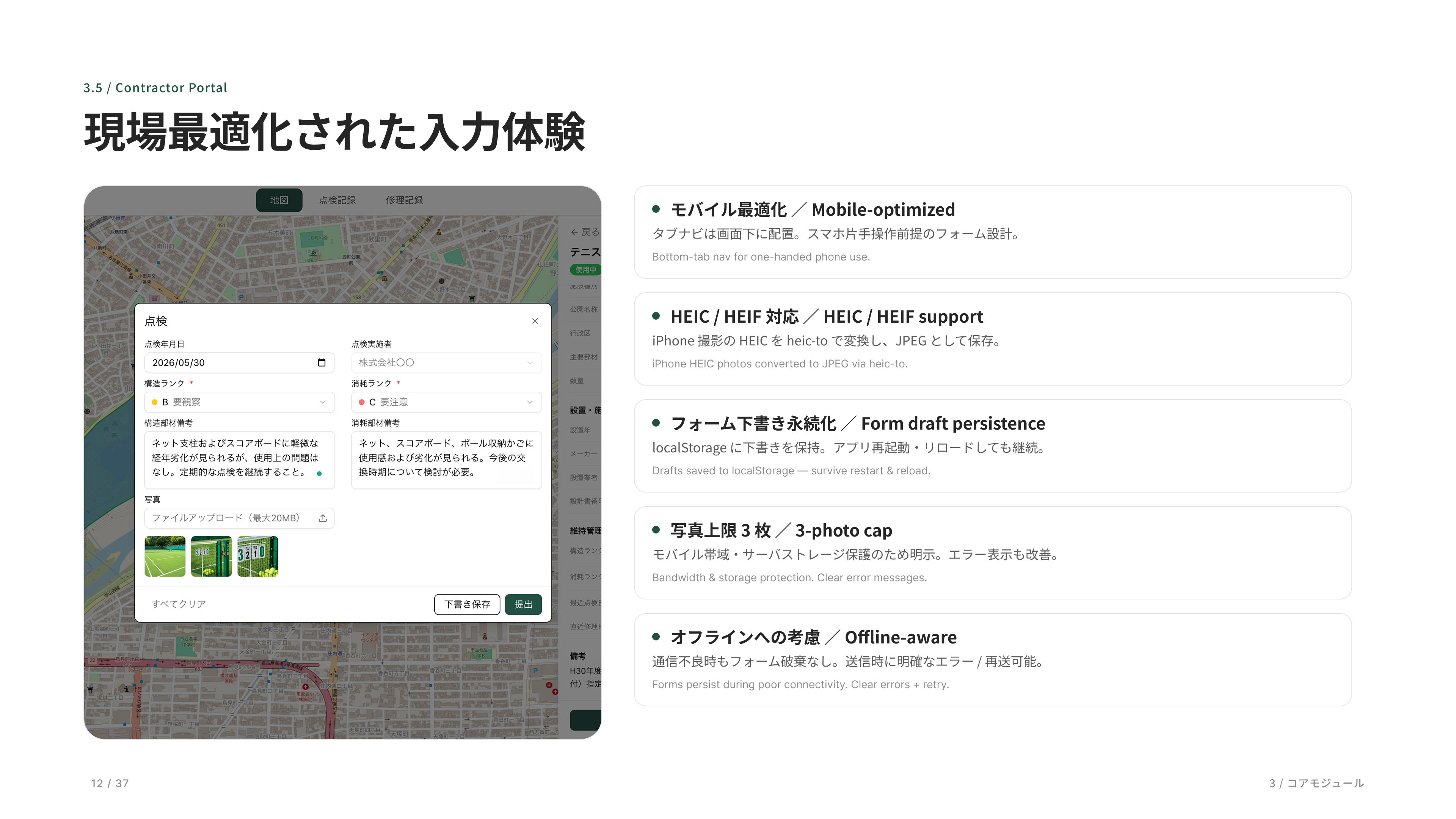
業者ポータルは現場で使うことを想定してモバイル最適化しています。HEIC 写真対応、フォーム下書き保存、写真上限 3 枚など、現場の制約を踏まえた設計です。
The contractor portal is optimized for mobile use in the field. It supports HEIC photo uploads, draft saving for partially completed forms, and a three-photo upload limit, reflecting the practical constraints and workflows of on-site operations.
業者用モバイル画面。現場で写真と一緒に点検結果を提出します。現場の業者さんがタブレットから入力する画面です。一覧から点検を開いて評価を選び、その場で提出まで完了します。現場の業者さんがタブレットから入力する画面です。一覧から点検を開いて評価を選び、その場で提出まで完了します。
Mobile interface for field contractors. Contractors can open assigned inspections from a task list, record condition assessments, attach photos, and submit results directly from a tablet. The entire inspection workflow can be completed on-site in a single streamlined process.
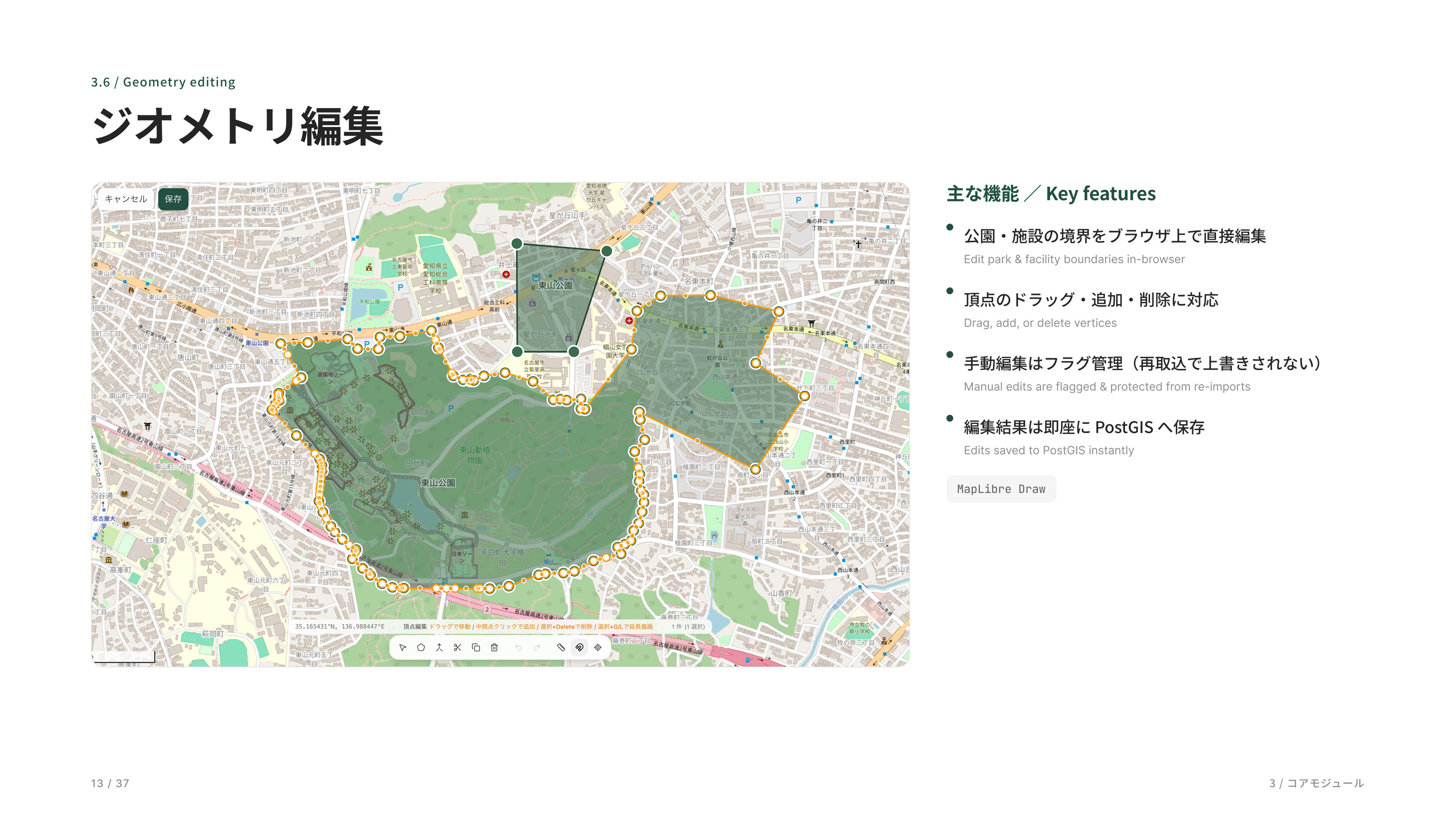
公園や施設の境界をブラウザ上で直接編集できる機能です。MapLibre Draw で頂点をドラッグ・追加・削除でき、編集結果はすぐに PostGIS に保存されます。手で編集したものはフラグで保護され、外部データの再取り込みで上書きされません。
This feature allows park and facility boundaries to be edited directly in the browser. Using MapLibre Draw, users can drag, add, or remove vertices, with changes immediately persisted to PostGIS. Manually edited geometries are protected by a dedicated flag, ensuring they are not overwritten during future external data imports.
公園の形を編集する画面です。頂点をドラッグして境界を直し、新しい区域を描いて結合すれば一つの公園にまとまります。最後に保存して完了です。
This screen is used to edit park boundaries. Users can adjust existing shapes by dragging vertices, draw and merge new areas into the park geometry, and then save the updated boundary with a single action.
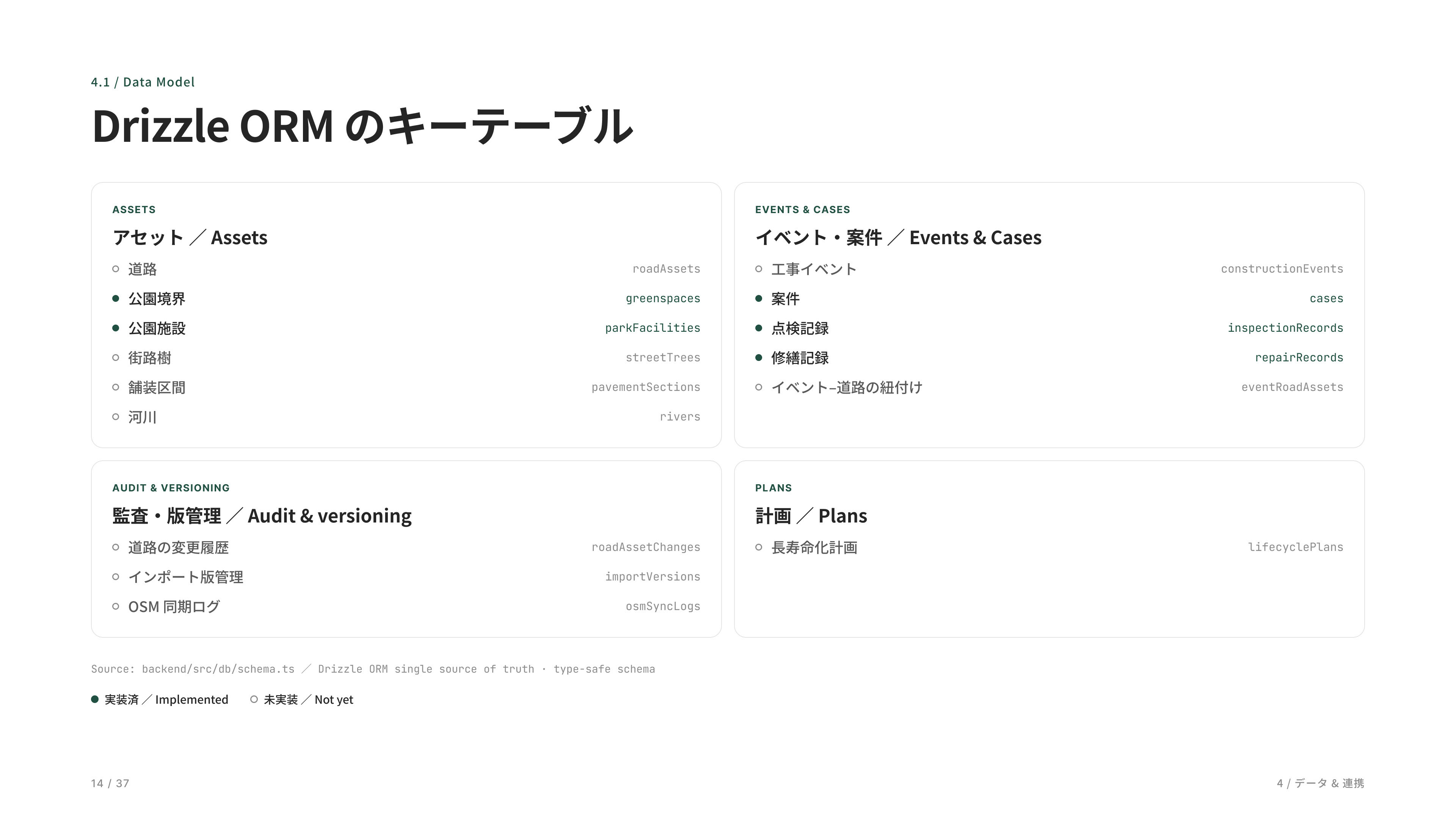
データベースの主要テーブルです。緑が現プロトタイプで実装済み、グレーがスキーマだけ用意してある未実装です。実装済みは公園境界・公園施設(アセット系)と、cases・点検記録・修繕記録(案件系)の 5 つ。道路・街路樹・舗装区間・河川、工事イベント、版管理、OSM 同期などはスキーマのみの未実装です。
This diagram shows the primary database tables. Green indicates tables that are fully implemented in the current prototype, while gray represents schemas that have been defined but are not yet implemented. The implemented tables include park boundaries and park facilities (asset management), as well as cases, inspection records, and maintenance records (work management). Schemas for roads, street trees, pavement segments, rivers, construction events, version management, and OSM synchronization are already in place and can be implemented as future extensions.
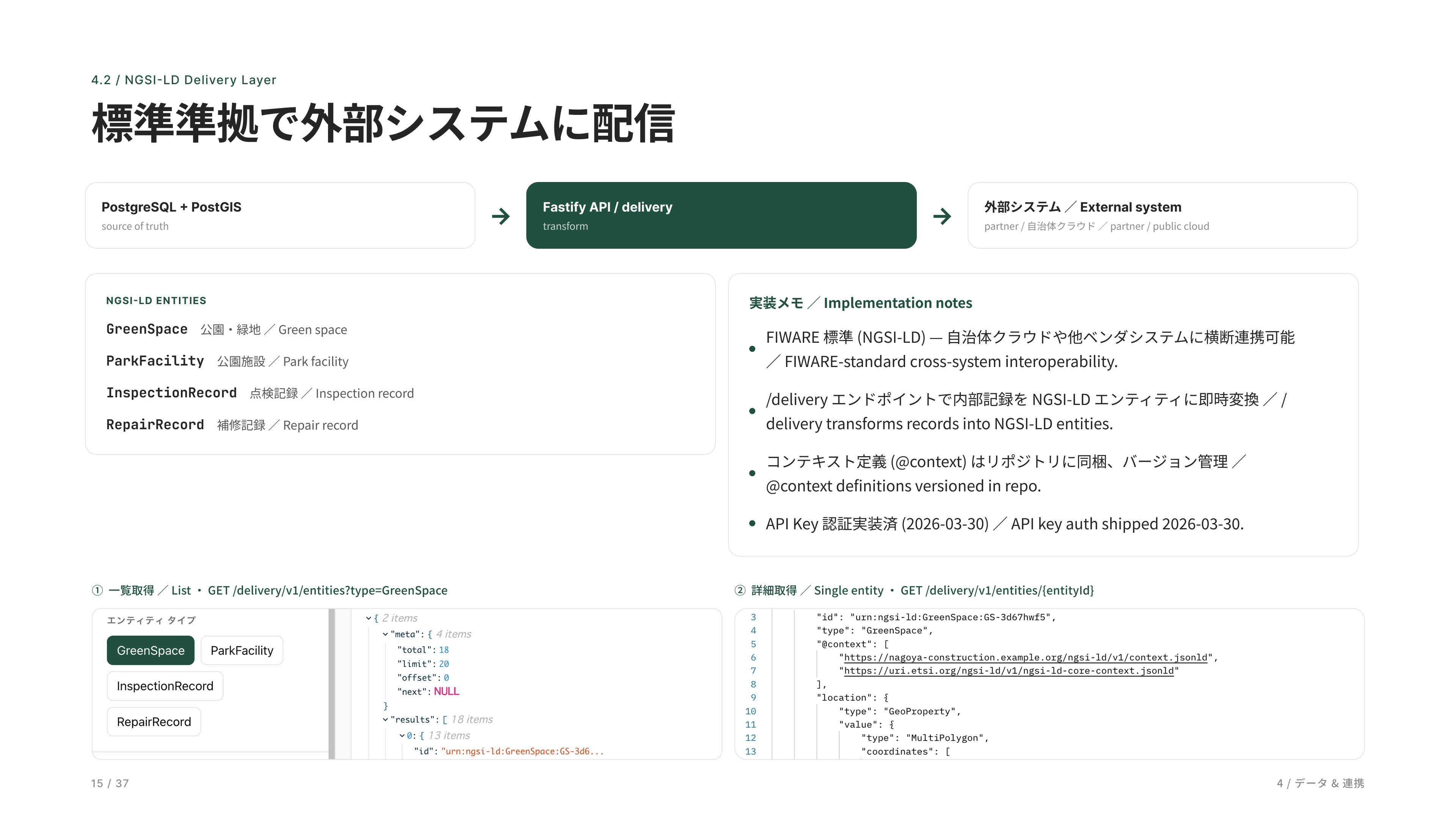
外部システムとの連携層です。FIWARE NGSI-LD標準に準拠しているため、自治体クラウドや他ベンダーのシステムとも連携できます。
This is the integration layer for external systems. By conforming to the FIWARE NGSI-LD standard, the platform can interoperate with municipal cloud environments and third-party vendor systems through a standardized data model and API framework.
Delivery API 経由のデータ配信の実装エリア。NGSI-LD と OGC で外部システムに公開できます。市民向け公開 UI は本プロトタイプには含まれません。
外部システムへデータを届ける配信APIです。公園や施設の情報を標準フォーマットで取得でき、件数やページ送りもそのまま確認できます。
This area implements data delivery through the Delivery API. Park and facility information can be published to external systems using NGSI-LD and OGC standards, with support for standardized queries, record counts, and pagination. A public-facing citizen portal is not included in the current prototype.
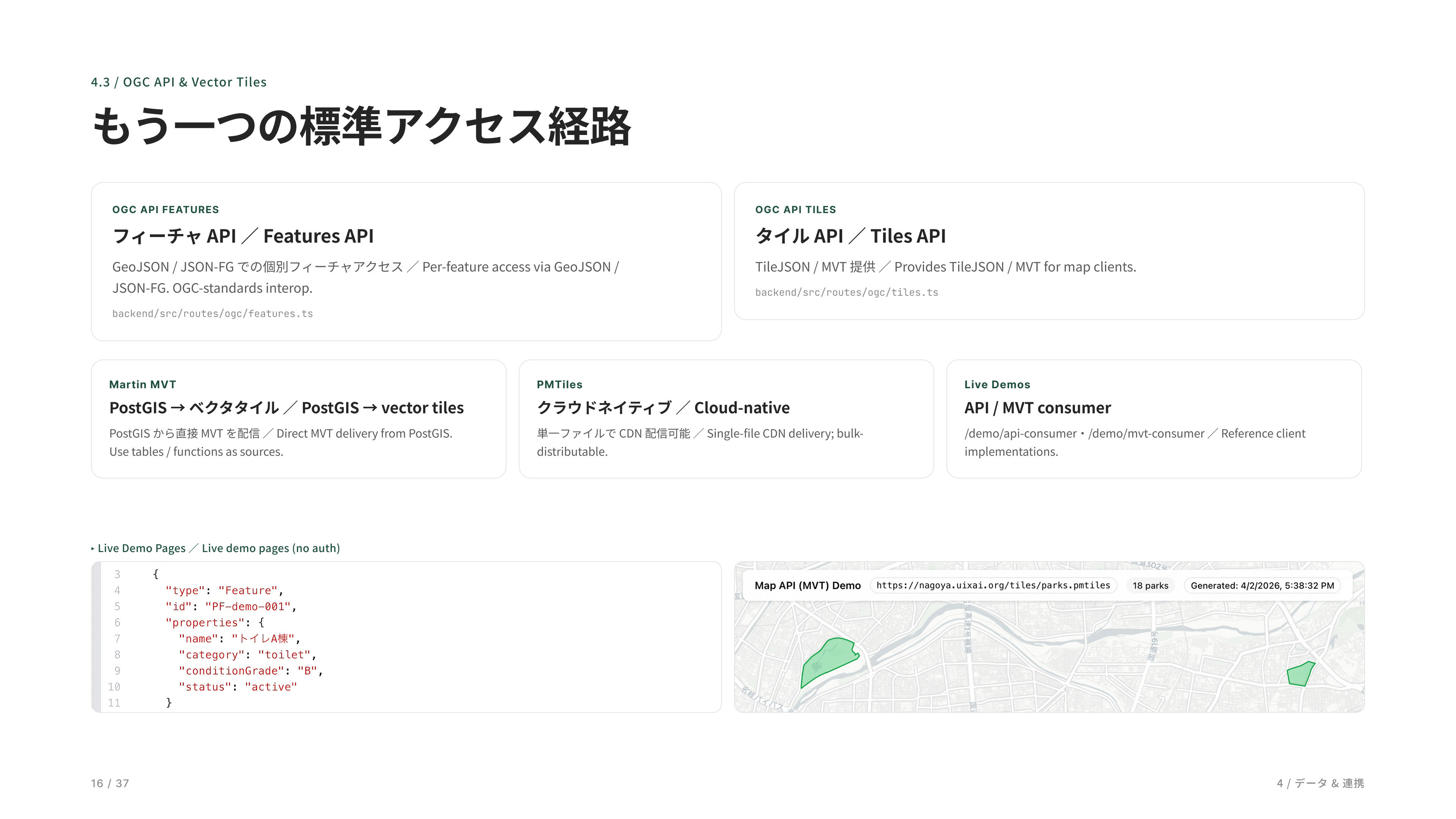
OGC API に対応したデータ配信デモです。公園や施設の情報を GeoJSON やベクタタイルとして取得でき、地図描画や外部システムとの連携に活用できます。タイルデータは PostGIS から直接生成し、PMTiles を利用することでクラウドネイティブな配信構成にも対応しています。NGSI-LD と OGC という二つの国際標準をサポートしているため、他ベンダーのシステムや一般的な GIS ツールからもそのまま利用できる高い相互運用性を実現しています。
This demo showcases OGC API–compliant data delivery. Park and facility data can be accessed as GeoJSON or vector tiles for map visualization and integration with external systems. Tile data is generated directly from PostGIS, while PMTiles enables a cloud-native distribution model. By supporting both NGSI-LD and OGC international standards, the platform provides a high level of interoperability, allowing data to be consumed directly by third-party systems and widely used GIS tools.
地理空間データを国際標準の形式で配信するAPIです。提供しているデータの一覧から地物をそのまま取得でき、標準に沿っているので他のシステムともすぐに連携できます。
This API delivers geospatial data using international standards. Users can browse available datasets and retrieve geographic features directly, enabling straightforward integration with other systems through a standards-based interface.
ベクトルタイル(MVT / PMTiles)で公園データを配信するデモです。地図上に公園ポリゴンを軽量かつ鮮明に表示し、市内へズームしても快適に閲覧できます。公園をクリックすると、名称・ID・分類・区などの地物属性をポップアップで確認でき、配信エンドポイントもあわせて提示します。
This demo delivers park data as vector tiles (MVT / PMTiles), enabling lightweight and high-performance map rendering. Park polygons remain crisp and responsive even when zooming into the city. By clicking a park, users can view feature attributes such as its name, ID, category, and district, while the corresponding tile service endpoint is also displayed for reference.
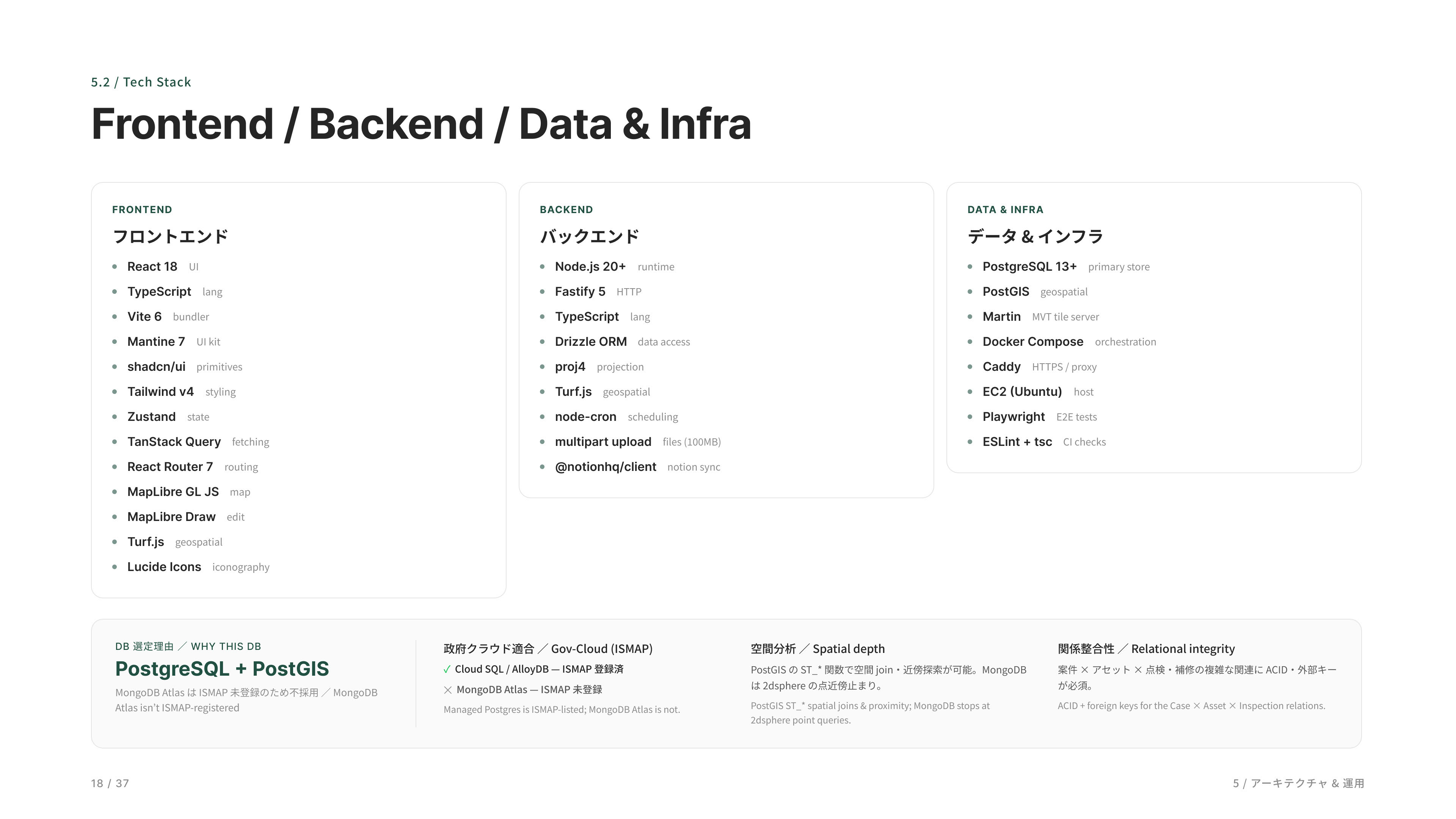
使っている技術の一覧です。フロントエンド、バックエンド、データ・インフラの 3 列でまとめました。
This slide summarizes the technologies used in the prototype, organized into three layers: frontend, backend, and data & infrastructure.
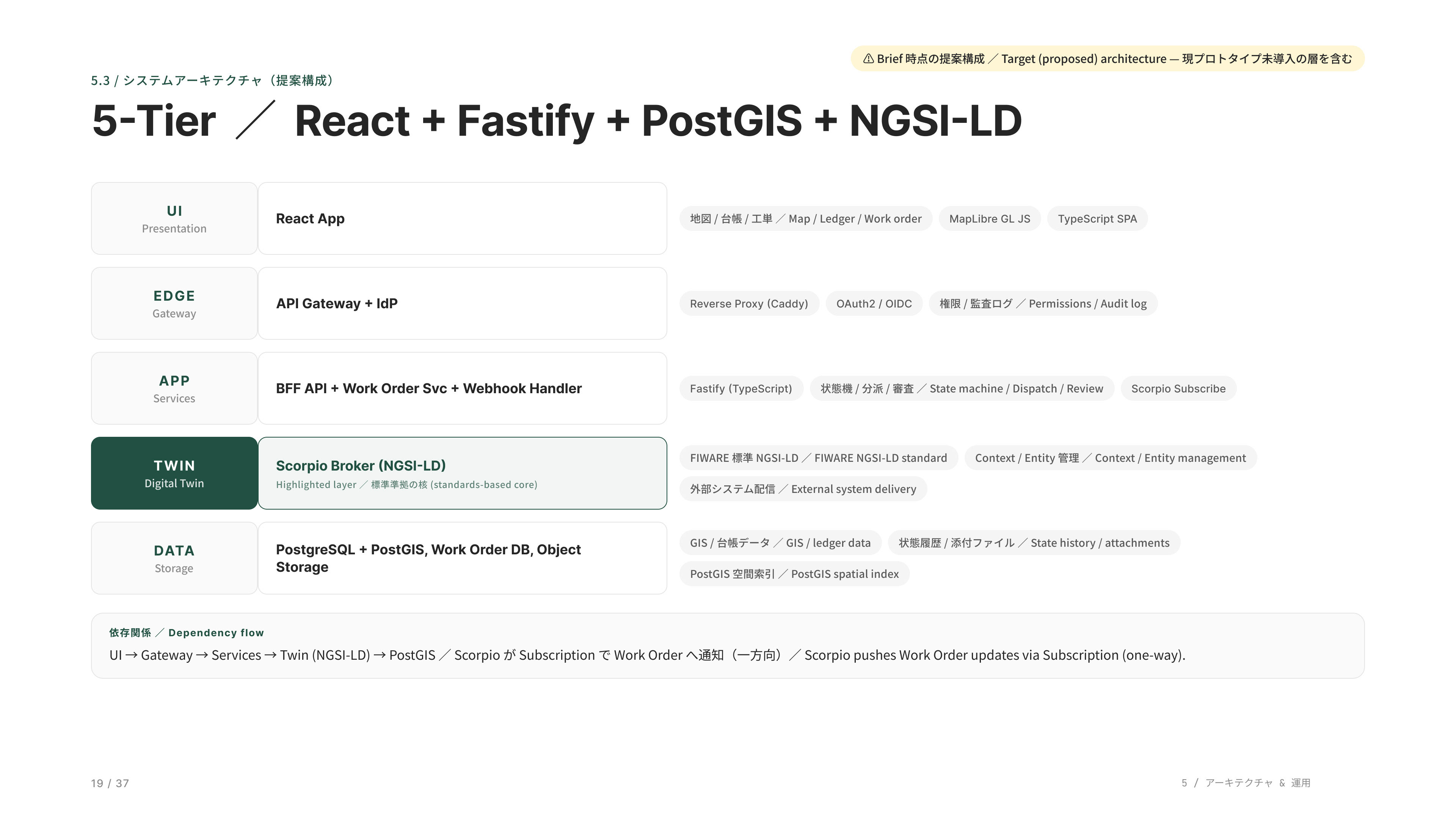
【Brief 時点の提案構成(Target architecture)】FIWARE の Scorpio/Orion-LD など NGSI-LD ブローカーを Twin 層に置いた 5 層スタックの将来像です。現プロトタイプはブローカーを使わず、Fastify の /delivery が PostgreSQL から直接 NGSI-LD 変換して配信しています。
This diagram illustrates the target architecture proposed in the Brief: a five-layer stack with an NGSI-LD broker, such as FIWARE Scorpio or Orion-LD, serving as the Digital Twin layer. The current prototype takes a simpler approach—without a broker—where the Fastify-based Delivery API transforms data directly from PostgreSQL into NGSI-LD format for external distribution.
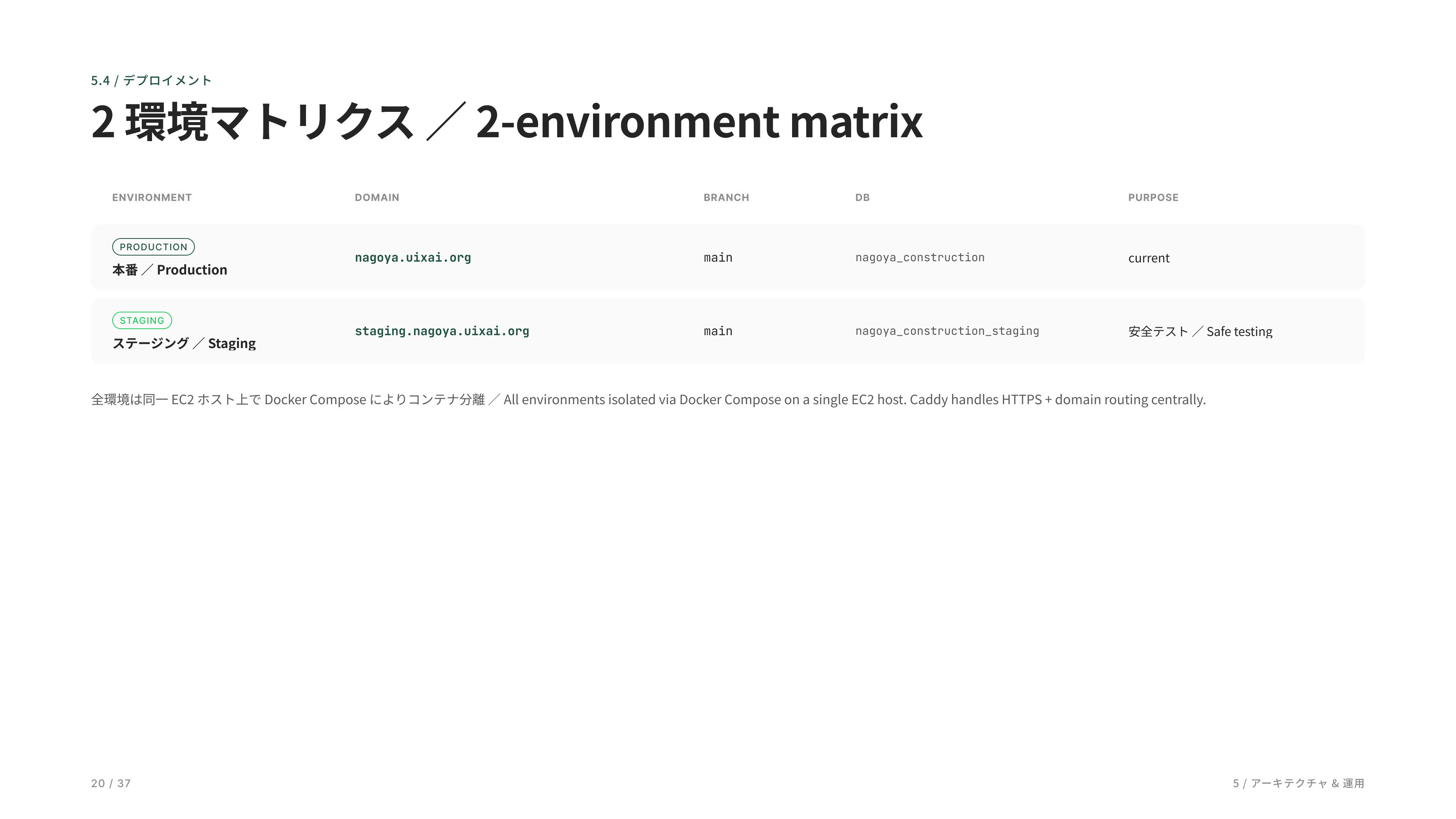
デプロイ環境は 2 つで、同じサーバ上でコンテナを分けて運用しています。本番に手を入れずに v1 を保ったまま、staging で検証できます。
The deployment environment consists of two isolated instances running on the same server through separate containers. This allows new features and changes to be validated in staging while keeping the production environment stable and unchanged.
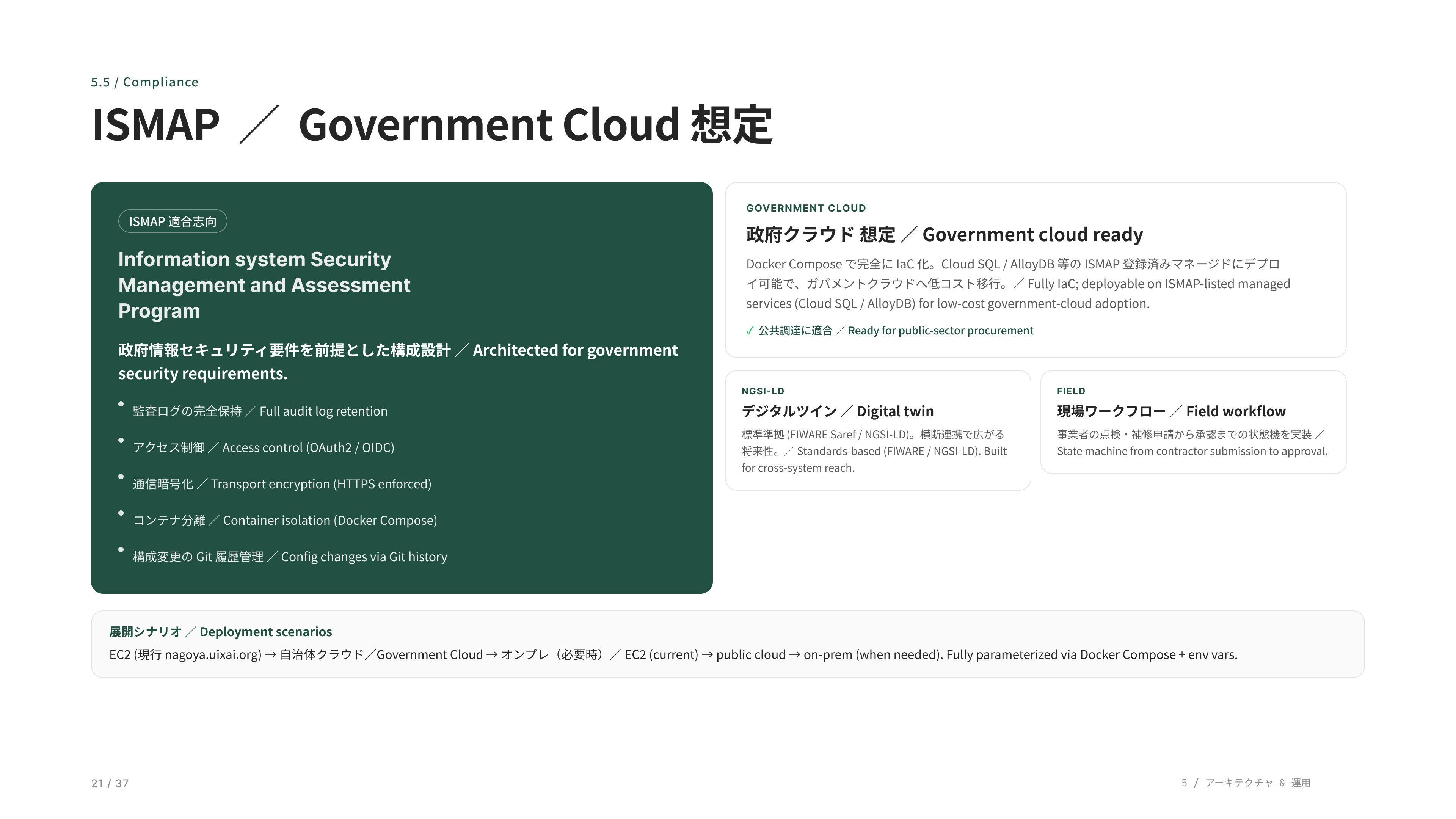
政府クラウド対応です。ISMAP 適合志向で監査ログやアクセス制御を標準装備。Docker ベースなので政府クラウドへの移植が容易です。
Government cloud readiness. The platform is designed with ISMAP-aligned practices in mind, including audit logging and access control as standard capabilities. Its containerized Docker-based architecture also enables straightforward deployment and portability across government cloud environments.
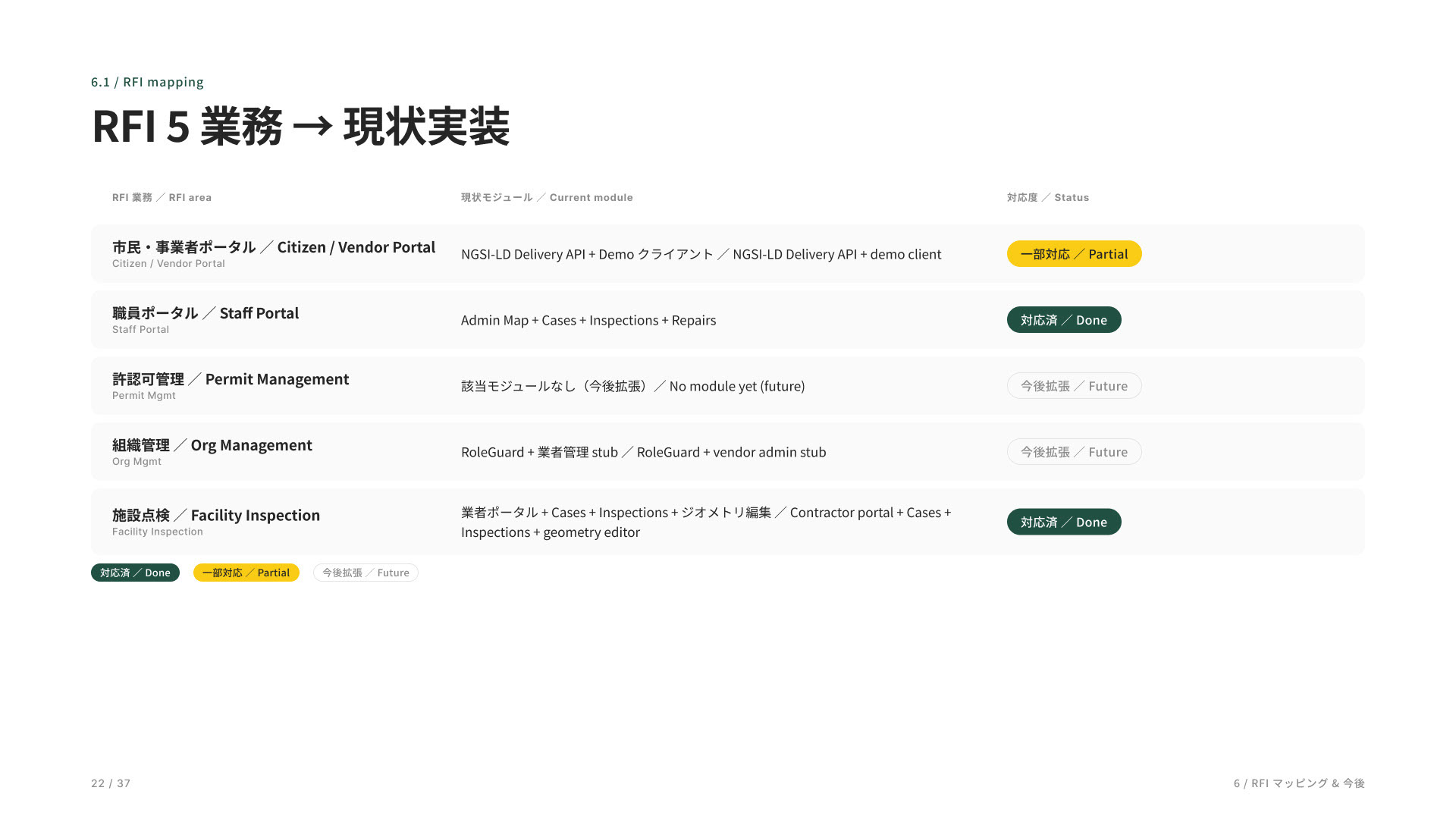
ここが RFI 5 業務への対応表です。職員ポータルと施設点検は対応済み、市民ポータルは一部対応(Delivery API)、許認可と組織管理は今後拡張という状況です。
This table maps the prototype against the five operational areas defined in the RFI. The Staff Portal and Facility Inspection functions are fully implemented, the Citizen Portal is partially supported through the Delivery API, and Permitting and Organization Management are planned for future expansion.
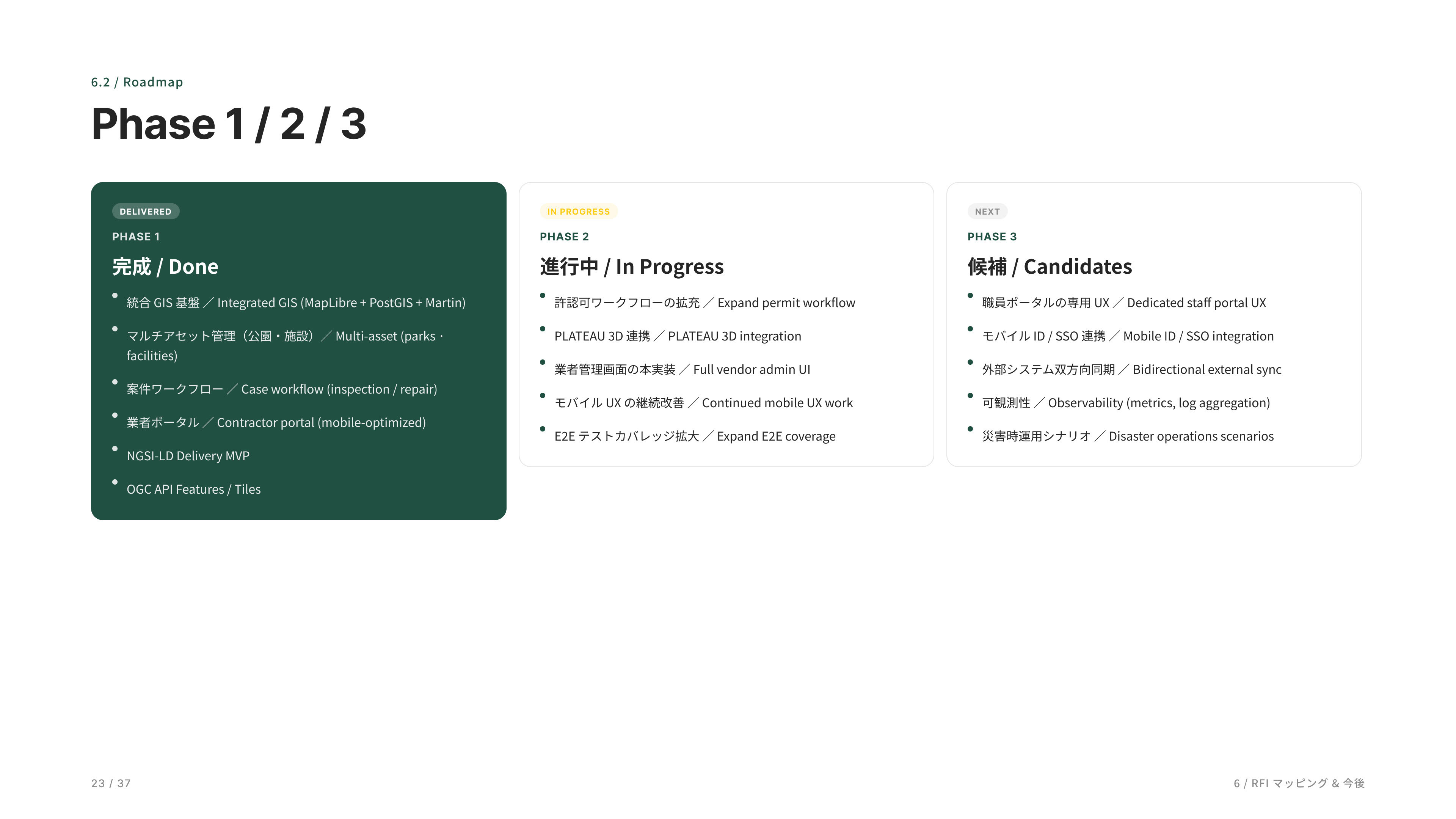
ロードマップです。Phase 1 は完成して稼働中、Phase 2 は今進行中、Phase 3 は将来候補。
This roadmap outlines the project phases. Phase 1 has been completed and is currently operational, Phase 2 is actively in progress, and Phase 3 represents future expansion opportunities under consideration.
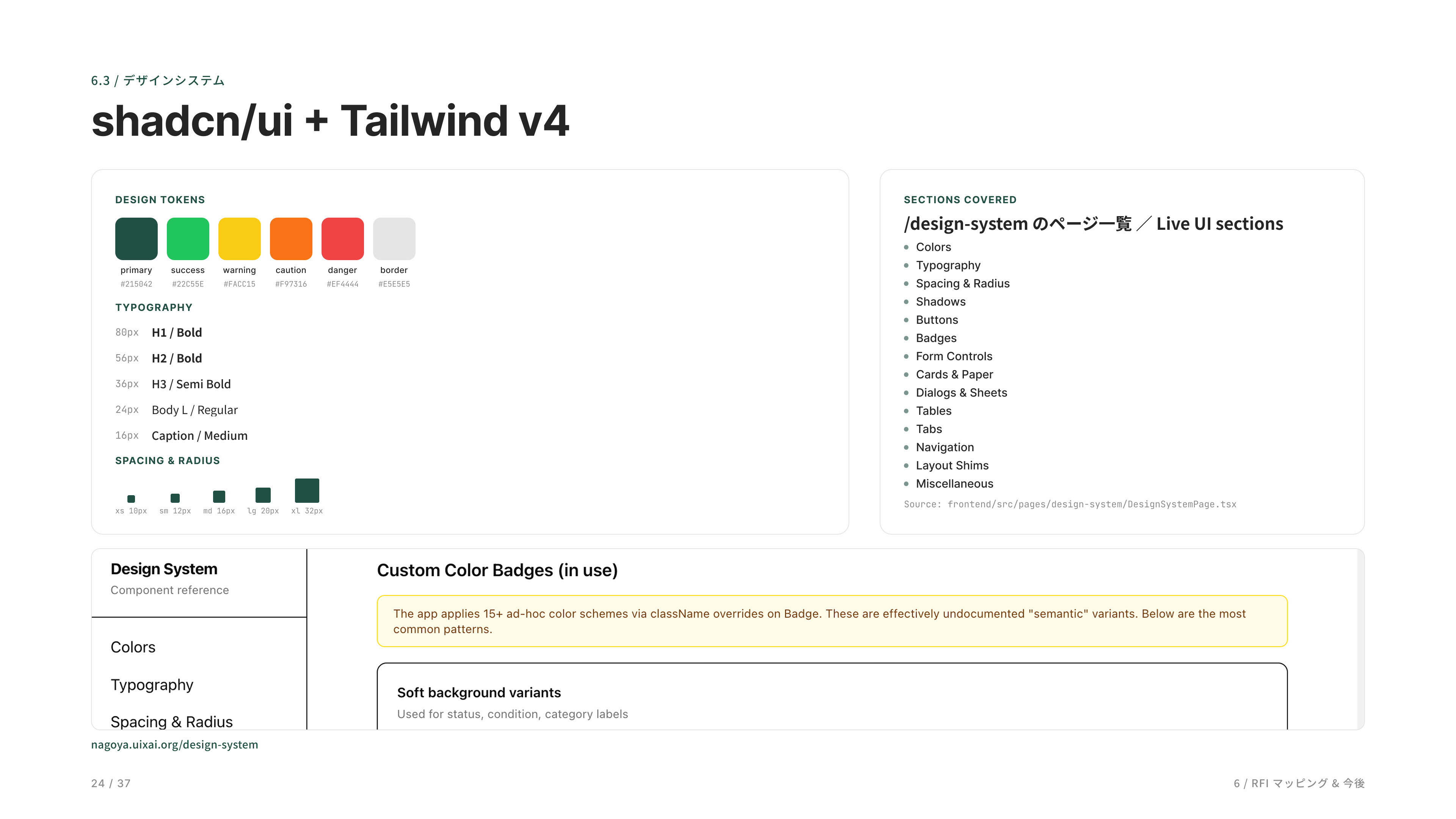
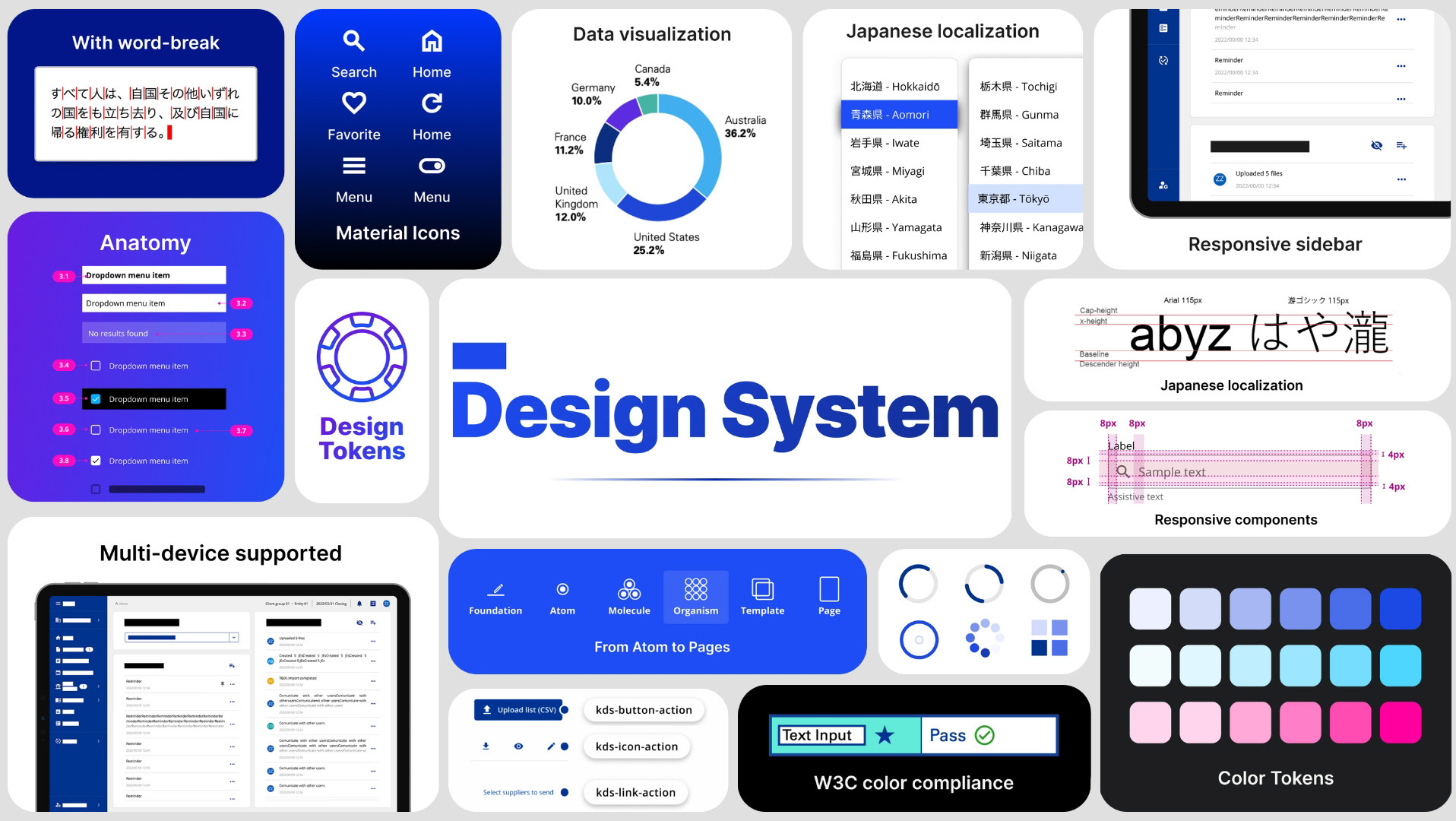
デザインシステムです。Tailwind と shadcn/ui で構築しています。実際に動いているシステムが `/design-system` で確認できます。
This is the design system used across the platform. It is built with Tailwind CSS and shadcn/ui, and a live implementation can be explored through the /design-system showcase.
ライブデザインシステム画面。`/design-system` で全 14 セクションのコンポーネントが見られます。
アプリで実際に使われている色や文字、ボタン・テーブルなどの部品を、そのままブラウザで一覧できるページです。その場で動かして確認でき、デザインと実装がいつも一致した状態を保てます。
アプリで実際に使われている色や文字、ボタン・テーブルなどの部品を、そのままブラウザで一覧できるページです。その場で動かして確認でき、デザインと実装がいつも一致した状態を保てます。
Live Design System view. The /design-system page showcases all 14 component sections used across the application. It provides a browser-based catalog of the actual colors, typography, buttons, tables, and UI components used in production, allowing teams to interact with them directly and ensure design and implementation remain consistently aligned.
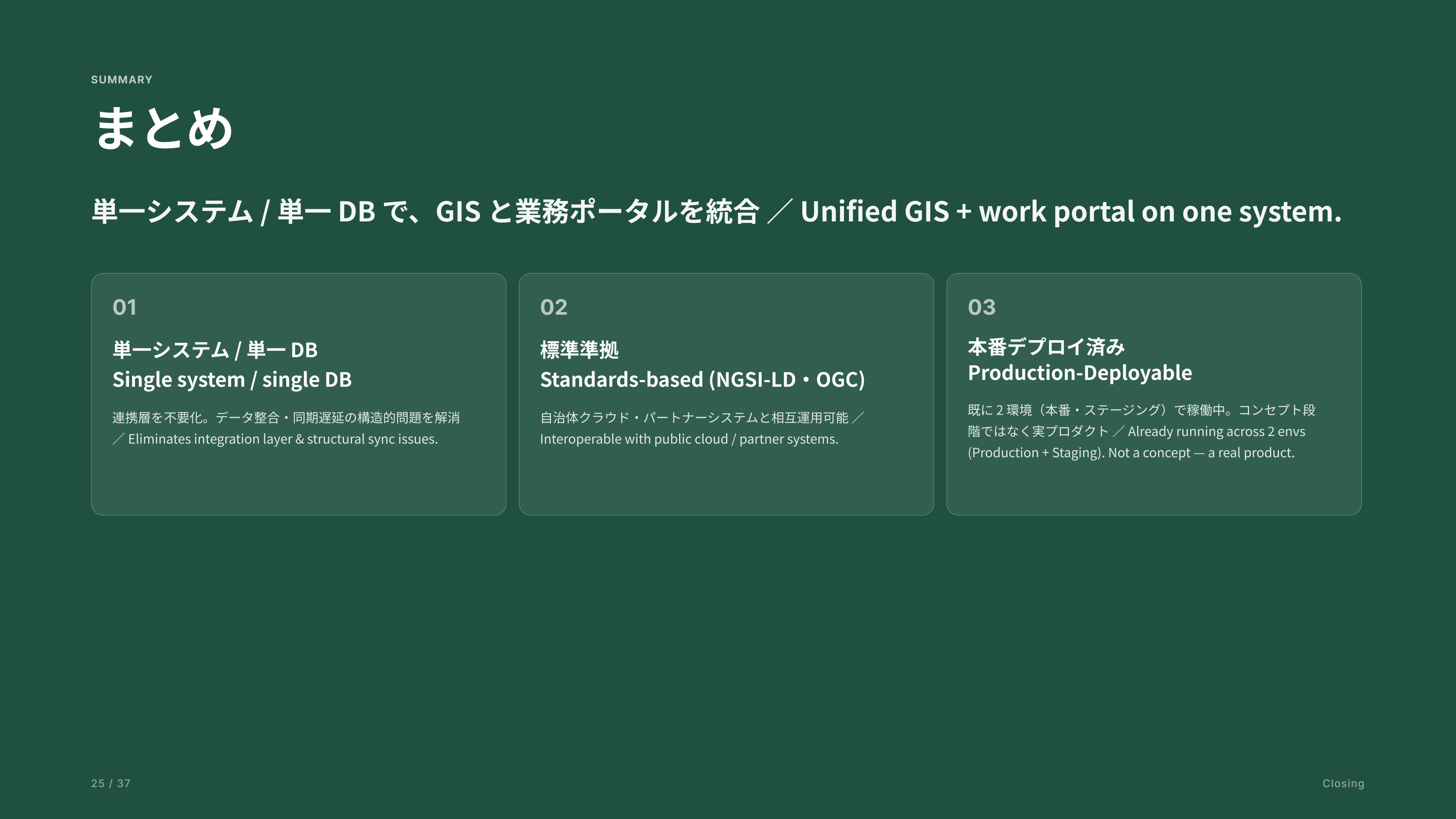
まとめです。差別化ポイントは 3 つ。単一システム、標準準拠(NGSI-LD・OGC)、既に 4 環境で稼働中、というところです。
In summary, the solution is differentiated by three key strengths: a unified single-system architecture, compliance with open standards such as NGSI-LD and OGC, and proven operation across four deployed environments.
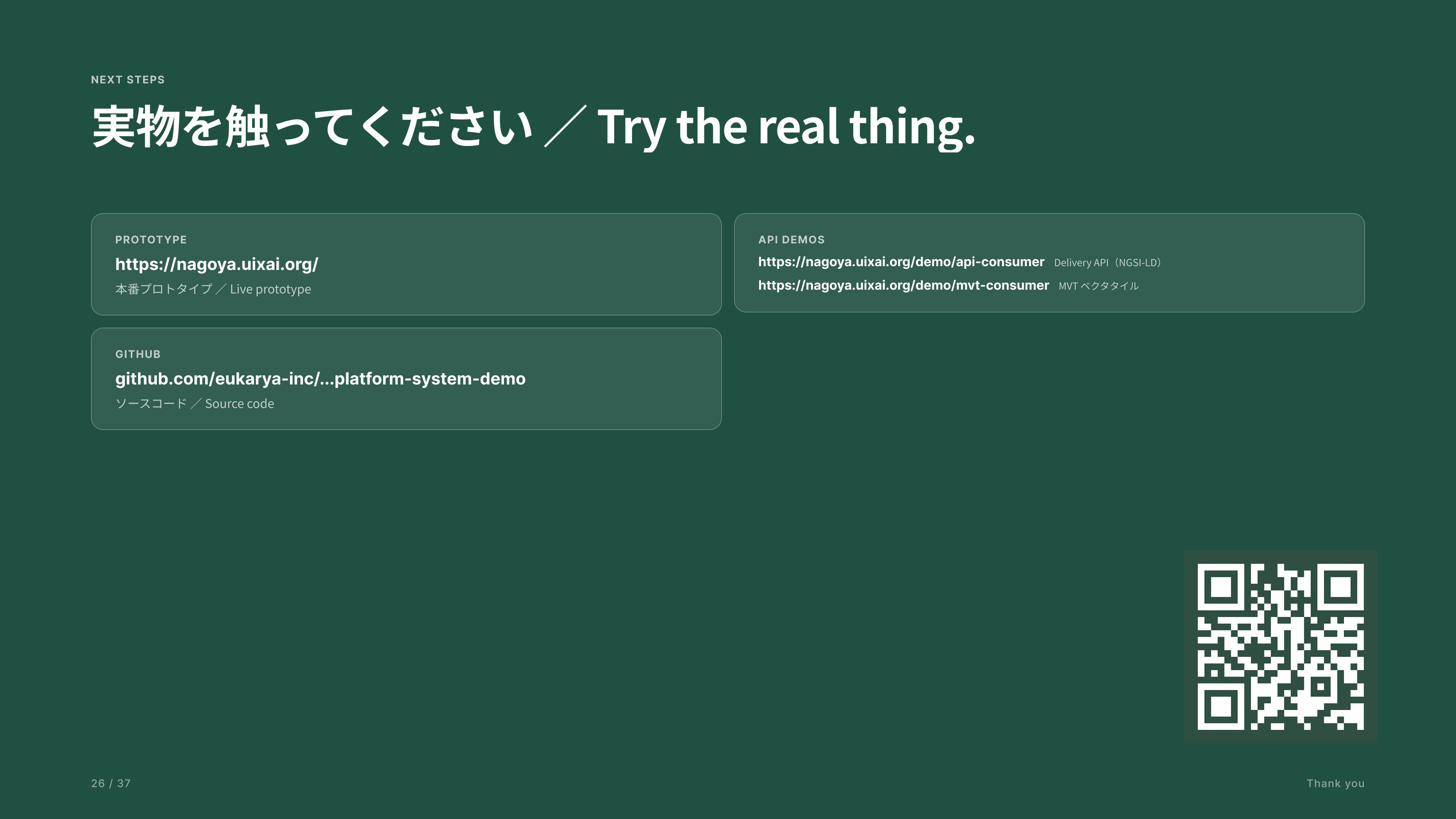
ここで終わりです。プロトタイプは認証不要でお試しいただけます。
The prototype is available for hands-on evaluation and can be accessed without authentication.